Thread Rating:
  • 0 Vote(s) - 0 Average
  • 1
  • 2
  • 3
  • 4
  • 5
Gradius Collection
#1
Genre : Space Shooter
Region : EU
Format : CSO
Version : v0.7-53-g79823fa
Game ID : ULES00381
OS : Win
Compatibility : Menus
Notes : None of collection games working-black screen after selecting a game


Attached Files Thumbnail(s)
   
Reply
#2
I tested ULUS10103 and it kinda goes ingame but it doesnt load the graphics at all. You can actually see whats going on and shoot (and definitely kill) the enemies if you turn wireframe mode on.
       
Windows 7 x64: Intel Core i5 4570 @3.6 Ghz, ATI Radeon HD 7870
Android 4.4.2 (CM11): Samsung Galaxy S3 @ 4x1.6 Ghz CPU, 600Mhz GPU
Reply
#3
yes you can hear things in the background but not seeing them Smile
Reply
#4
interesting console message(When you choose game)


Attached Files Thumbnail(s)
   
Reply
#5
Region: JP
Format: ISO
Version: PPSSPP v0.7.6-1007-g7aba4e0 win32 build.
Game ID: ULJM05091
OS: Win
Compatibility:
Choose menu shows up properly. But problems in the games:
Gradius: Game appears to load up properly. The sound is fine and by pressing START -> DOWN -> START, one can go back to the main menu. However, there is no display. Error message:    
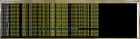
Gradius 2: Same as Gradius. Error message is the same as Gradius 1.
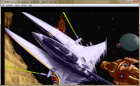
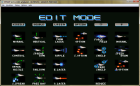
Gradius 3: Part of the game display is outside the PPSSPP window. Also missing some layers in game display (such as 1 PLAYER, OPTIONS, RETURN TO MAIN MENU in title screen     and the weapon selection boxes     ). Then no display (but sound) in game. Error message is the same as Gradius 1.
Gradius 4: Playable, though show the same error message as Gradius 1.
Gradius Gaidan: same as Gradius. Error message is the same as Gradius 1.
Reply
#6
Game: ULUS10103: GRADIUS COLLECTION
Format: ISO
Version: PPSSPP v0.9.6-784-gde1c756 win32 build.

Game still plays as it did in the last post, only Gradius IV is in a playable state.
Reply
#7
v0.9.7.1-10-g96a19ea-windows-amd64
Same problem

Not sure this problrem
Code:
20:13:816 user_main W[G3D]: GLES\Framebuffer.cpp:1702 Block transfer download (not supported) 04044000 -> 04110000 20:13:819 user_main W[G3D]: GLES\FragmentShaderGenerator.cpp:522 Color test function : ==

If use soft gpu,have screen


Attached Files
.7z   ppssppinfolog.7z (Size: 41.91 KB / Downloads: 1,385)
.7z   ppssppdebuglog.7z (Size: 250.68 KB / Downloads: 1,309)
I want to be a crash fixer
PM me if you want to me look a game
Reply
#8
Game: ULUS10103: GRADIUS COLLECTION
Format: ISO
Version: PPSSPP v0.9.8

All games Playable with full speed on Software mode except for Gradius III which is slow and has some weird graphics.


Attached Files Thumbnail(s)
       
Reply
#9
How does this game look now with the "simulate block transfer" option enabled?

-[Unknown]
Reply
#10
v0.9.8-942-ge598775 with the setting,
seem playable
(06-01-2014, 04:58 AM)[Unknown] Wrote: How does this game look now with the "simulate block transfer" option enabled?

-[Unknown]


Attached Files
.7z   ppsspplog.7z (Size: 5.14 KB / Downloads: 1,172)
I want to be a crash fixer
PM me if you want to me look a game
Reply
#11
Moved.
♦ Intel Core i7-6700HQ | 16 GB RAM | NVIDIA GeForce GTX 960M | Debian Testing
♦ Intel Core i7-2630QM | 4 GB RAM | NVIDIA GeForce GT 540M | Debian Testing
♦ PSP-3004 | 6.60 PRO-C2
Reply
#12
I think there are some display issue. The emulator fails to show everything in the screen in its window for Gradius 3 and Gradius Gaiden. See in gradius3.png that there is an enemy on the top right corner but the background is not shown up. In Gradius gaiden, we see traces of previous game on the top of the screen (those things above "1P 3100 CREDITS 9"). The power meter at the bottom of the screen is missing. The screen doesn't appear to be centered properly. This degrades gaming experience.


Attached Files Thumbnail(s)
       
Reply
#13
v0.9.8-1064-g90b30f8 appears to have solved the issue in Gradius 3. The Gradius gaiden still suffers.

(06-03-2014, 02:20 AM)tylau0 Wrote: I think there are some display issue. The emulator fails to show everything in the screen in its window for Gradius 3 and Gradius Gaiden. See in gradius3.png that there is an enemy on the top right corner but the background is not shown up. In Gradius gaiden, we see traces of previous game on the top of the screen (those things above "1P 3100 CREDITS 9"). The power meter at the bottom of the screen is missing. The screen doesn't appear to be centered properly. This degrades gaming experience.


Attached Files Thumbnail(s)
   
Reply
#14
Is the smaller screenshot Gaiden? What is it supposed to look like - centered, stretched?

Are you using "buffered rendering"? Any other mode is likely to have bugs. I also suggest enabling "simulate block transfers".

-[Unknown]
Reply
#15
Please see the attached screenshots for details. Both have buffered rendering (the default setting) and simulate block transfer enabled (I need to check it under Graphics -> Rendering Mode).

The correct display behavior is shown in gradiusGaidenSoftwareRendering.png. I make it by further enabling software rendering (Graphics -> Debugging -> software rendering (experimental)) You can see that the play screen is centered properly. We have the power meter at the bottom left corner of the play screen.

But if we use the default rendering mode (i.e. not using software rendering), the screen is shown in gaiden.png. You can see the the play screen is translated a bit downward, thus blocking the bottom part of the play screen (which has the power meter) from showing.

(06-07-2014, 07:01 PM)[Unknown] Wrote: Is the smaller screenshot Gaiden? What is it supposed to look like - centered, stretched?

Are you using "buffered rendering"? Any other mode is likely to have bugs. I also suggest enabling "simulate block transfers".

-[Unknown]


Attached Files Thumbnail(s)
       
Reply


Forum Jump:
