Posts: 1,795
Threads: 17
Joined: Sep 2013
Reputation:
158
@nover this is just a simple effect, I don't understand this scanline fetish myself, but it's quick to port so ~ catch:
Vertex:
Code: uniform vec2 u_pixelDelta;
attribute vec4 a_position;
attribute vec2 a_texcoord0;
varying vec2 v_texcoord0;
varying vec2 omega;
void main() {
v_texcoord0 = a_texcoord0;
gl_Position = a_position;
omega = 3.141592654 * (1.0/u_pixelDelta);
}
Fragment:
Code: #ifdef GL_ES
precision mediump float;
precision mediump int;
#endif
uniform sampler2D sampler0;
varying vec2 v_texcoord0;
varying vec2 omega;
//configuration (higher values mean brighter image but reduced effect depth)
const float brighten_scanlines = 16.0;
const float brighten_lcd = 4.0;
const float size = 2.0;
void main() {
const vec3 offsets = 3.141592654 * vec3(1.0/2.0,1.0/2.0 - 2.0/3.0,1.0/2.0-4.0/3.0);
vec2 angle = v_texcoord0.xy * omega / size;
float yfactor = (brighten_scanlines + sin(angle.y)) / (brighten_scanlines + 1.0);
vec3 xfactors = (brighten_lcd + sin(angle.x + offsets)) / (brighten_lcd + 1.0);
gl_FragColor.rgb = yfactor * xfactors * texture2D(sampler0, v_texcoord0.xy).rgb;
gl_FragColor.a = 1.0;
}
Note it might differ a bit as I had to guess what "rubyTextureSize" exactly is in the emulator you took it from, I also added "size" which you can change to pick different size of those "scanlines".
Just create vsh/fsh files and create an ini file with whatever name you want:
Code: [LCD3x]
Name=LCD3x
Fragment=name_of_your_file.fsh
Vertex=name_of_your_file.vsh
OutputResolution=True
then put all those 3 files into your shaders folder and next time you run ppsspp it should have it on the list, hopefully working unless I made some typo(;p).
If you created the files earlier, make sure to add "OutputResolution=True" for that shader in the ini file, that's kind of important.
http://forums.ppsspp.org/showthread.php?tid=6594 - Custom PPSSPP Shaders!
http://forums.ppsspp.org/showthread.php?tid=3590&pid=117172#pid117172 - simple CE scripts to help creating CWCheats,
https://github.com/LunaMoo/PPSSPP_workarounds - CWCheat workarounds.
Posts: 4
Threads: 0
Joined: Jun 2016
Reputation:
0
(06-11-2016, 11:03 PM)LunaMoo Wrote: [...]
Sweet! It worked! 
Thanks a lot. And that size variable took a bit of tweaking as well, but it was too easy thanks to you.
Thanks again 
Posts: 4
Threads: 0
Joined: Jun 2016
Reputation:
0
06-12-2016, 03:05 AM
(This post was last modified: 06-12-2016, 03:52 AM by nover.)
(06-11-2016, 11:03 PM)LunaMoo Wrote: [...]
Wait a sec, it looks reaaally good on PC. The scanlines are rendered perfectly. But on Android, I have some problems.
It's "fine" if I leave size = 2.0, but the scanlines are rendered too big. To make them smaller, I reduced size to 1.0, but the vertical lines now overlap and interfere. So I need a way to reduce the size of the scanlines without this interference effect.
Here are some screens from Corpse Party to try and demonstrate the issue.
When size = 2.0 (scanlines too large): EDIT: there's also some interference in this one too, but it's less noticeable
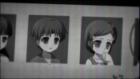
When size = 1.0 (scanlines smaller, but there's interference):
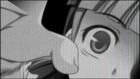

The left side of the image looks fine, but it gets worse as it goes to the right.
I think it might have something to do with the "vec3 xfactors" line, but of course, I have almost no idea what I'm talking about. I hope I can get some help.
Thanks!
EDIT: Here's the code again:
lcd3x.vsh
Code: uniform vec2 u_pixelDelta;
attribute vec4 a_position;
attribute vec2 a_texcoord0;
varying vec2 v_texcoord0;
varying vec2 omega;
void main() {
v_texcoord0 = a_texcoord0;
gl_Position = a_position;
omega = 3.141592654 * (1.0/u_pixelDelta);
}
lcd3x.fsh
Code: #ifdef GL_ES
precision mediump float;
precision mediump int;
#endif
uniform sampler2D sampler0;
varying vec2 v_texcoord0;
varying vec2 omega;
//configuration (higher values mean brighter image but reduced effect depth)
const float brighten_scanlines = 16.0;
const float brighten_lcd = 4.0;
const float size = 1.0;
void main() {
const vec3 offsets = 3.141592654 * vec3(1.0/2.0,1.0/2.0 - 2.0/3.0,1.0/2.0-4.0/3.0);
vec2 angle = v_texcoord0.xy * omega / size;
float yfactor = (brighten_scanlines + sin(angle.y)) / (brighten_scanlines + 1.0);
vec3 xfactors = (brighten_lcd + sin(angle.x + offsets)) / (brighten_lcd + 1.0);
gl_FragColor.rgb = yfactor * xfactors * texture2D(sampler0, v_texcoord0.xy).rgb;
gl_FragColor.a = 1.0;
}
Posts: 1,795
Threads: 17
Joined: Sep 2013
Reputation:
158
You can try removing:
Code: #ifdef GL_ES
precision mediump float;
precision mediump int;
#endif
Which is the code that makes it less accurate, I'm not really using android so don't really know if it's needed for all devices or only to improve performance as mobile gpu's are much weaker and problematic, there's a chance you don't need it, and without this it should hopefully work same way as on pc(that is if your mobile gpu doesn't get other issues).
http://forums.ppsspp.org/showthread.php?tid=6594 - Custom PPSSPP Shaders!
http://forums.ppsspp.org/showthread.php?tid=3590&pid=117172#pid117172 - simple CE scripts to help creating CWCheats,
https://github.com/LunaMoo/PPSSPP_workarounds - CWCheat workarounds.
Posts: 3,228
Threads: 25
Joined: Nov 2012
Reputation:
98
You can also try changing "mediump" to "highp".
Some mobile devices don't support that higher accuracy, though.
-[Unknown]
Posts: 4
Threads: 0
Joined: Jun 2016
Reputation:
0
06-12-2016, 02:25 PM
(This post was last modified: 06-12-2016, 02:28 PM by nover.)
(06-12-2016, 06:54 AM)LunaMoo Wrote: You can try removing:
Code: #ifdef GL_ES
precision mediump float;
precision mediump int;
#endif
Unfortunately, this didn't work. The interference still appears - in fact, there seems to be more than before. :/
(06-12-2016, 11:54 AM)[Unknown] Wrote: You can also try changing "mediump" to "highp".
Some mobile devices don't support that higher accuracy, though.
-[Unknown]
But ^this worked! It looks really nice now! Problem solved.
Thanks SO much LunaMoo and [Unknown] for all your patience and help!
Posts: 1,795
Threads: 17
Joined: Sep 2013
Reputation:
158
Cool:3 ~ learn something new every day, I assumed precision define for GLES is only needed to decrease it ~ apparently not.
http://forums.ppsspp.org/showthread.php?tid=6594 - Custom PPSSPP Shaders!
http://forums.ppsspp.org/showthread.php?tid=3590&pid=117172#pid117172 - simple CE scripts to help creating CWCheats,
https://github.com/LunaMoo/PPSSPP_workarounds - CWCheat workarounds.
Posts: 6
Threads: 2
Joined: Dec 2013
Reputation:
0
(06-12-2016, 02:25 PM)nover Wrote: (06-12-2016, 06:54 AM)LunaMoo Wrote: You can try removing:
Code: #ifdef GL_ES
precision mediump float;
precision mediump int;
#endif
Unfortunately, this didn't work. The interference still appears - in fact, there seems to be more than before. :/
(06-12-2016, 11:54 AM)[Unknown] Wrote: You can also try changing "mediump" to "highp".
Some mobile devices don't support that higher accuracy, though.
-[Unknown]
But ^this worked! It looks really nice now! Problem solved.
Thanks SO much LunaMoo and [Unknown] for all your patience and help! would it be possible to upload the 3 files pretty please?
Posts: 6
Threads: 1
Joined: Jan 2016
Reputation:
0
How would I go about coding/creating a simple horizontal black 100% scanlines filter? You know for 2d sprite based games to make them look better and clean up 50% of the extra pixels?
Posts: 24
Threads: 0
Joined: Aug 2015
Reputation:
0
(08-12-2016, 12:49 AM)dcloud466 Wrote: How would I go about coding/creating a simple horizontal black 100% scanlines filter? You know for 2d sprite based games to make them look better and clean up 50% of the extra pixels?
Well you could try the preset file 2 in my scanline shader to see if you like it: http://nix.moderatelyimpressive.com/shad...nes1.1.zip
If you want 100% black scanlines and less blur you could further configure that particular file too. Most of the filter stuff in preset 2 is already turned off, but to get what you want, change these values under the "customization settings" to the following:
Code: float scanlines = 1.0;
float lineblur = 0.0;
Though personally I think fully black scanlines are a bit harsh, you can try changing the "scanlines" value to anything between 1.0 and 0.0 to get the darkness you want. 
Posts: 3
Threads: 0
Joined: Nov 2015
Reputation:
0
08-24-2016, 12:42 PM
(This post was last modified: 08-24-2016, 12:46 PM by papermanzero.)
I wanted to ask if it is possible to update xBRZ texture scaling to Super xBR with the option of Bilateral Filtering.
xBRZ is ok, but the main issue is the posterize effect.
Meanwhile Super xBR surpassed the quality of xBRZ. Especially the posterize effect is much less.
Combined with Fast Bilateral it is almost gone.
Currently it is tested with PSX games which have also the issue of pixel textures.
Super xBR together with Bilateral increases the picture quality imo in an amazing way.
Super xBR Shader Source:
Github -> Libretro -> Shaders -> Super xBR
Fast Bilateral for Super xBR Source:
Github -> Libretro -> Shaders -> Denoisers -> Fast Bilateral
I wanted to post some samples but it seems not possible 
Screenshots:
Super xBR:
http://abload.de/img/retroarch-0504-213811jruk7.png
Super xBR with fast Bilateral
http://abload.de/img/retroarch-0504-213856a8u91.png
Super xBR:
http://abload.de/img/retroarch-0504-2142053tuho.png
Super xBR with fast Bilateral
http://abload.de/img/retroarch-0504-21422878u69.png
Super xBR:
http://abload.de/img/retroarch-0504-2147424fuwg.png
Super xBR with fast Bilateral
http://abload.de/img/retroarch-0504-214817e2uhg.png
Super xBR
http://abload.de/img/retroarch-0428-093725cifha.png
Super xBR with fast Bilateral
http://abload.de/img/retroarch-0428-09373974eqe.png
Would it be possible to add a Super xBR with Fast Bilateral for texture filtering in PPSSPP?
Posts: 6
Threads: 1
Joined: Jan 2016
Reputation:
0
09-11-2016, 10:52 PM
(This post was last modified: 09-11-2016, 11:23 PM by dcloud466.)
(08-21-2016, 05:45 PM)Nick001 Wrote: (08-12-2016, 12:49 AM)dcloud466 Wrote: How would I go about coding/creating a simple horizontal black 100% scanlines filter? You know for 2d sprite based games to make them look better and clean up 50% of the extra pixels?
Well you could try the preset file 2 in my scanline shader to see if you like it.
If you want 100% black scanlines and less blur you could further configure that particular file too. Most of the filter stuff in preset 2 is already turned off, but to get what you want, change these values under the "customization settings" to the following:
Code: float scanlines = 1.0;
float lineblur = 0.0;
Though personally I think fully black scanlines are a bit harsh, you can try changing the "scanlines" value to anything between 1.0 and 0.0 to get the darkness you want.
Hi!
I've been a bit busy. But thanks I'll see what I can change up to get something as near as I'm looking for. I'll see what looks good. I know 100% black scanlines can get quite dark so we'll see. sometimes I like using about 50-60%.
I'll check back in periodically and mention how things go.
- ChoW
Thanks Nick001!
I'm Liking these 3 shaders/filters. I set the scanline and lineblur to those settings and it looks awesome to me. Although it is a bit dark I'm use to that. I'll get some setting I'm happy with for sure. I like the grilled arcade look. It looks tasty!! =D
Posts: 5
Threads: 0
Joined: Sep 2016
Reputation:
0
09-20-2016, 06:44 PM
(This post was last modified: 09-20-2016, 06:45 PM by Rick1974.)
@Nick001
I'm having issues with your arcade scanline shaders; They do not want to display correctly. Only the bottom right quarter will display. The rest is black...
Here's a link to what is happening
h t t p:// s11.postimg.org /o9139yvbn /ULUS10018_00000.jpg
(remove the spaces since I cannot post links yet)
I'm on PPSSPP 1.3 Windows 7x64, Radeon HD7750 1920x1080 display.
I'm trying to get away from RetroArch, but having a hard time leaving their shaders
If anyone can help figure out what's wrong, it'd be most appreciated
Posts: 1,795
Threads: 17
Joined: Sep 2013
Reputation:
158
@Rick1974 you mean those shaders from this post above?
I can't see anything wrong with them, did you edited them in any way?
The only thing which I see that might be potentially problematic with those shaders is the fact that they reuse default fxaa.vsh instead of providing unique copy, so if you changed that file for example by downloading different shader that replaces it or by trying to make your own shader by modifying default fxaa, it could potentially mess things up.
Maybe some graphic driver settings could affect it as well, like some scaling maybe messes up ppsspp coordinates.
http://forums.ppsspp.org/showthread.php?tid=6594 - Custom PPSSPP Shaders!
http://forums.ppsspp.org/showthread.php?tid=3590&pid=117172#pid117172 - simple CE scripts to help creating CWCheats,
https://github.com/LunaMoo/PPSSPP_workarounds - CWCheat workarounds.
Posts: 5
Threads: 0
Joined: Sep 2016
Reputation:
0
Here's a picture of what's happening
I can't post links yet, so you need to paste in your browser and remove the spaces
h t t p:// s11.postimg.org /o9139yvbn /ULUS10018_00000.jpg
Thanks for your help!
|




