Posts: 7
Threads: 0
Joined: Dec 2015
Reputation:
0
 12-30-2015, 08:54 PM
(This post was last modified: 12-30-2015, 09:01 PM by mohsen86.)
Posts: 11
Threads: 1
Joined: Nov 2015
Reputation:
0
Yeah, please repost. I need to redownload. That other site seems skecthy.
Thanks
Posts: 358
Threads: 13
Joined: Mar 2013
Reputation:
15
(12-30-2015, 08:54 PM)mohsen86 Wrote: (11-05-2015, 09:14 AM)onelight Wrote: [b]This builds is based on ****/hrydgard/ppsspp
....
Download
Windows
PPSSPP-v1.1.1-202-Adhoc_stuff-chatSimple.7z:
***.545c.***/file/129193040 or
***.mediafire.***/download/a2ozjriauzqs63d/PPSSPP-v1.1.1-202-Adhoc_stuff-chatSimple.7z
...
Hi...
The file at mediafire is deleted.
▼
.

Also downloading from that Chinese Website, is impossible!
▼
Can you upload that file in somewhere else please?
For example: uploaded.net or DepositFiles or Mega or d-h.st .
 The right bottun downloading from that Chinese Website is "普通下载"
http://ul.to/90cdevqn
PPSSPP-v1.1.1-202 Adhoc-stuff-chatSimple.7z
Posts: 116
Threads: 15
Joined: Dec 2013
Reputation:
3
I found out when my brother playing gundam vs gundam next plus with hotspot, he will ge sometime run slower from 100% to 60 when enter lobby and playing with me 1vs1 with this build but it run perfectly when play 1vs1 with cpu(offline),can this be fix? His phone is Lenovo A850+
Sry for bad english im chinese at malaysia
Posts: 358
Threads: 13
Joined: Mar 2013
Reputation:
15
(01-01-2016, 07:45 AM)NgJinXiang14 Wrote: I found out when my brother playing gundam vs gundam next plus with hotspot, he will ge sometime run slower from 100% to 60 when enter lobby and playing with me 1vs1 with this build but it run perfectly when play 1vs1 with cpu(offline),can this be fix? His phone is Lenovo A850+
Try Trameskipping and auto frameskip
Posts: 116
Threads: 15
Joined: Dec 2013
Reputation:
3
01-01-2016, 10:12 AM
(This post was last modified: 01-01-2016, 10:12 AM by NgJinXiang14.)
Yes we had try it, only he get this problem but im not
Sry for bad english im chinese at malaysia
Posts: 358
Threads: 13
Joined: Mar 2013
Reputation:
15
(01-01-2016, 10:12 AM)NgJinXiang14 Wrote: Yes we had try it, only he get this problem but im not
he need a new phone.
Posts: 116
Threads: 15
Joined: Dec 2013
Reputation:
3
Ok.. .....
Sry for bad english im chinese at malaysia
Posts: 7
Threads: 0
Joined: Dec 2015
Reputation:
0
Posts: 7
Threads: 0
Joined: Dec 2015
Reputation:
0
(11-05-2015, 09:14 AM)onelight Wrote: This builds is based on https :// github .com /hrydgard/ppsspp/pull/8134
play TEKKEN 6 multiplayer on one PC
(video=youtube)
Download
Windows
PPSSPP-v1.1.1-202-Adhoc_stuff-chatSimple.7z:
http :// www .545c .com /file/129193040 or....
........
....
..
.
I could not connect two PPSSPPs on same PC!
It always gives me network error.
Here are my settings:
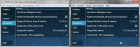
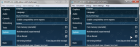
.
If I start to connect on one of the PPSSPPs, then it'll shows the 'Battle Lobby' without problems! But on the second PPSSPP, it gives network error.
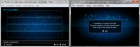
.
This time started to connect with the Right-side PPSSPP, connected with no error. But again, network error on the second one...

I've turned off Firewall and the Internet, but nothing...
Also the "Remote Desktop" and the "Remote Assistance" in my 'System Properties' are turned off! What to do now? Do I need to turn them on? 
Posts: 358
Threads: 13
Joined: Mar 2013
Reputation:
15
(01-09-2016, 03:33 PM)mohsen86 Wrote: I've turned off Firewall and the Internet, but nothing...
Also the "Remote Desktop" and the "Remote Assistance" in my 'System Properties' are turned off! What to do now? Do I need to turn them on?
turned off Firewall and Internet is Unnecessary
Posts: 7
Threads: 0
Joined: Dec 2015
Reputation:
0
(01-10-2016, 01:36 AM)onelight Wrote: (01-09-2016, 03:33 PM)mohsen86 Wrote: I've turned off Firewall and the Internet, but nothing...
Also the "Remote Desktop" and the "Remote Assistance" in my 'System Properties' are turned off! What to do now? Do I need to turn them on?
turned off Firewall and Internet is Unnecessary
Thanks for the answer. 
But I've tested with both, on and off Firewall/Internet!
And could not connect two PPSSPP emulators. 
Maybe something is wrong with my "sharing settings"?
I'm using Win7, SP1, 64bit with latest updates.
That's very strange. and confusing!
Posts: 1
Threads: 0
Joined: Jan 2016
Reputation:
0
Someone can reupload the file PPSSPP-v1.1.1-202 Adhoc-stuff-chatSimple.7z, I dont know why but uploaded dont work for me.... MEGA can be the optimal solution 
Posts: 358
Threads: 13
Joined: Mar 2013
Reputation:
15
(01-10-2016, 05:33 PM)mohsen86 Wrote: (01-10-2016, 01:36 AM)onelight Wrote: (01-09-2016, 03:33 PM)mohsen86 Wrote: I've turned off Firewall and the Internet, but nothing...
Also the "Remote Desktop" and the "Remote Assistance" in my 'System Properties' are turned off! What to do now? Do I need to turn them on?
turned off Firewall and Internet is Unnecessary
Thanks for the answer.
But I've tested with both, on and off Firewall/Internet!
And could not connect two PPSSPP emulators.
Maybe something is wrong with my "sharing settings"?
I'm using Win7, SP1, 64bit with latest updates.
That's very strange. and confusing!
Try using AdhocServer.exe http://www.sn9.us/file/92865164
run Adhocserver.exe and disable buil-in pro adhoc server.
Posts: 7
Threads: 0
Joined: Dec 2015
Reputation:
0
(01-11-2016, 09:16 AM)onelight Wrote: (01-10-2016, 05:33 PM)mohsen86 Wrote: (01-10-2016, 01:36 AM)onelight Wrote: (01-09-2016, 03:33 PM)mohsen86 Wrote: I've turned off Firewall and the Internet, but nothing...
Also the "Remote Desktop" and the "Remote Assistance" in my 'System Properties' are turned off! What to do now? Do I need to turn them on?
turned off Firewall and Internet is Unnecessary
Thanks for the answer.
But I've tested with both, on and off Firewall/Internet!
And could not connect two PPSSPP emulators.
Maybe something is wrong with my "sharing settings"?
I'm using Win7, SP1, 64bit with latest updates.
That's very strange. and confusing!
Try using AdhocServer.exe http :// www .sn9.us/file/92865164
run Adhocserver.exe and disable buil-in pro adhoc server.
Thank you...
But it did not work. Just like when I tried with the 'buil-in pro adhoc server'.
No difference. It always connects only one of the PPSSPP emulators.
The other one can not connect.
|



