Posts: 4
Threads: 1
Joined: Mar 2015
Reputation:
0
 03-15-2015, 06:44 AM
(This post was last modified: 03-22-2015, 06:06 PM by vnctdj.)
03-15-2015, 06:44 AM
(This post was last modified: 03-22-2015, 06:06 PM by vnctdj.)
I have downloaded and extracted version 1.0.1
But when start the ppsspp it shows an error window...
PPSSPP has stoped working
Help me to run the application..
My pc's configuration are given below...
Processor Name: Pentium® Dual-Core CPU E6600 @ 3.06GHz
Video card Name: Intel® G41 Express Chipset (Microsoft Corporation - WDDM 1.1)
Installed Memory: 2.00 GB DDR3
Posts: 7
Threads: 1
Joined: Mar 2015
Reputation:
0
There are bugs in windows 8 it is recommemded that you downgrade your os to windows 7 for fully compatible
Posts: 456
Threads: 1
Joined: Nov 2013
Reputation:
23
(03-21-2015, 12:39 AM)opera2235 Wrote: There are bugs in windows 8 it is recommemded that you downgrade your os to windows 7 for fully compatible
What are you talking about, there is nothing in PPSSPP that is incompatible with Windows 8
Posts: 383
Threads: 8
Joined: Mar 2014
Reputation:
3
DId you update the driver? If you already done it, try go to ppsspp.ini and change GPUBackend = 1 to GPUBackend = 2
Old laptop: Lenovo G458
AMD/ATI Radeon HD 7310 | 1366x768@60Hz | APU E1-1200 Dual Core | 2.5 GB DDR3 400MHz | Windows 7 Home Premium 32-bit
New laptop: Lenovo ideapad 100
Nvidia Geforce 920M 2GB / Intel HD Graphics 5500 | 1366x768@60Hz | Intel Core i3-5005U 2GB | 2GB DDR3 2000MHz | Window 10 Home 64-bit
Posts: 4
Threads: 1
Joined: Mar 2015
Reputation:
0
03-21-2015, 03:35 AM
(This post was last modified: 03-21-2015, 03:40 AM by sam.bd.)
(03-21-2015, 01:33 AM)Accel Wrote: DId you update the driver? If you already done it, try go to ppsspp.ini and change GPUBackend = 1 to GPUBackend = 2
When I try to update my driver it says my driver is already up to date...
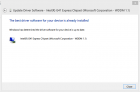
and another thing is that there is no ppsspp.ini file in the folder....
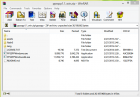
Kindly check attachments..
(03-21-2015, 12:39 AM)opera2235 Wrote: There are bugs in windows 8 it is recommemded that you downgrade your os to windows 7 for fully compatible
I don't want to turn back to windows 7. I have seen some people useing ppsspp in windows 8.1. I want to find out my problem. If I fail then I will think to turn back to windows 7....
Posts: 3,228
Threads: 25
Joined: Nov 2012
Reputation:
98
Unfortunately, PPSSPP and Intel GPUs (especially not recent ones) don't get along all that well.
1. Extract that entire zip to some folder on your desktop or where ever you want.
2. Make sure it still crashes running this way; you shouldn't be running it from inside the zip.
3. Create a folder inside the extracted folder with the name "memstick".
4. Create a folder inside memstick named "PSP".
5. Create another folder inside there named "SYSTEM".
6. Now, click in the address bar in the window, which will change to selectable text. It should end with SYSTEM. Copy it.
7. Open Notepad, and then (even though it's blank) go to Save As...
8. In the dialog that comes up, type a " (double quote mark), then paste the path, then type \ppsspp.ini" (starting with a \ and ending with a ", just like that.)
9. Now confirm with Save. You now have a correctly named ppsspp.ini (this process prevents Notepad from adding .txt, etc.)
10. Almost there. Paste into Notepad:
[Graphics]
GPUBackend = 1
11. Now, don't forget to save again. This time just use File -> Save.
12. Go back to the folder you extracted ppsspp to (NOT the zip), and run it from there.
I know, it seems like a long 12 step process, but it goes quick.
-[Unknown]
Posts: 7
Threads: 1
Joined: Mar 2015
Reputation:
0
the directx in windows 8 is not stable yet theres a possibility that it may fc so try the opengl by going to ppsspp\memstick\PSP\SYSTEM\ppspp.ini and change GPUBackend = 1 to GPUBackend = 2
Posts: 3,228
Threads: 25
Joined: Nov 2012
Reputation:
98
Err, I meant 2, yes.
The statement above about Windows 8 and DirectX or OpenGL will vary wildly by card. I think it's more appropriate to say this:
When using an old video card, you may experience more problems on more recent versions of operating systems, such as Windows 8. This is because these newer drivers are likely not as well tested with or as compatible with old video cards. This will depend on the quality control of the company who produced your video card and its drivers.
In my case, I'm using an NVIDIA GeForce 9800 GT. This card is probably only around 5 - 6 years old now, but I do not expect to encounter crashes using any backend (DirectX or OpenGL) on Windows 7, 8, or 8.1. It's no less stable anywhere. But results will vary for other manufacturers and ages of video card.
-[Unknown]
Posts: 4
Threads: 1
Joined: Mar 2015
Reputation:
0
(03-22-2015, 02:21 AM)[Unknown] Wrote: Err, I meant 2, yes.
The statement above about Windows 8 and DirectX or OpenGL will vary wildly by card. I think it's more appropriate to say this:
When using an old video card, you may experience more problems on more recent versions of operating systems, such as Windows 8. This is because these newer drivers are likely not as well tested with or as compatible with old video cards. This will depend on the quality control of the company who produced your video card and its drivers.
In my case, I'm using an NVIDIA GeForce 9800 GT. This card is probably only around 5 - 6 years old now, but I do not expect to encounter crashes using any backend (DirectX or OpenGL) on Windows 7, 8, or 8.1. It's no less stable anywhere. But results will vary for other manufacturers and ages of video card.
-[Unknown]
Not solved yet... Now got another error message...

In first message it ask to upgrade my directX bt I am using directX version 11
If I press yes to switch to DriectX 9 it shows another erros window...

And finally...
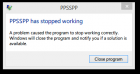
Posts: 3,228
Threads: 25
Joined: Nov 2012
Reputation:
98
You do not actually have DirectX 9 installed. I realize this can be a bit confusing, but DirectX 9 and DirectX 11 are different things.
With most software, a new version replaces the old version (like, say, most sports games.) But, with DirectX, in this case, it's more like Final Fantasy. Both are unique and separate. Just because you've played Final Fantasy 13 doesn't mean it's not worth trying Final Fantasy 10.
Windows 8 doesn't come with DirectX 9 fully pre-installed anymore. Also, you may or may not actually have a fully up-to-date DirectX install.
Try this:
http://www.microsoft.com/en-us/download/...aspx?id=35
If it doesn't work, try this:
http://www.microsoft.com/en-us/download/...px?id=8109
Note that for other games that use DirectX 9, you would also have to install this in Windows 8. It just doesn't come with it anymore.
-[Unknown]
Posts: 4
Threads: 1
Joined: Mar 2015
Reputation:
0
 03-22-2015, 05:25 PM
(03-22-2015, 06:34 AM)[Unknown] Wrote: You do not actually have DirectX 9 installed. I realize this can be a bit confusing, but DirectX 9 and DirectX 11 are different things.
With most software, a new version replaces the old version (like, say, most sports games.) But, with DirectX, in this case, it's more like Final Fantasy. Both are unique and separate. Just because you've played Final Fantasy 13 doesn't mean it's not worth trying Final Fantasy 10.
Windows 8 doesn't come with DirectX 9 fully pre-installed anymore. Also, you may or may not actually have a fully up-to-date DirectX install.
Try this:
--------------------------------------------------
If it doesn't work, try this:
---------------------------------------------------
Note that for other games that use DirectX 9, you would also have to install this in Windows 8. It just doesn't come with it anymore.
-[Unknown]
Problem solved! Thanks [Unknown] and others to help me... 
Posts: 5,371
Threads: 14
Joined: Mar 2013
Reputation:
303
Thread's title updated.
♦ Intel Core i7-6700HQ | 16 GB RAM | NVIDIA GeForce GTX 960M | Debian Testing
♦ Intel Core i7-2630QM | 4 GB RAM | NVIDIA GeForce GT 540M | Debian Testing
♦ PSP-3004 | 6.60 PRO-C2
Posts: 2
Threads: 0
Joined: Mar 2015
Reputation:
0
03-24-2015, 06:51 PM
(This post was last modified: 03-24-2015, 06:58 PM by Meandia.)
i have an Intel Core i5 | 4 GB RAM | NVIDIA GeForce GT 719M | Windows 8.1 *64bit assus and i have the same errors what do i do
??????
Posts: 331
Threads: 17
Joined: Feb 2013
Reputation:
5
(03-24-2015, 06:51 PM)Meandia Wrote: i have an Intel Core i5 | 4 GB RAM | NVIDIA GeForce GT 719M | Windows 8.1 *64bit assus and i have the same errors what do i do
??????
(03-22-2015, 06:34 AM)[Unknown] Wrote: You do not actually have DirectX 9 installed. I realize this can be a bit confusing, but DirectX 9 and DirectX 11 are different things.
With most software, a new version replaces the old version (like, say, most sports games.) But, with DirectX, in this case, it's more like Final Fantasy. Both are unique and separate. Just because you've played Final Fantasy 13 doesn't mean it's not worth trying Final Fantasy 10.
Windows 8 doesn't come with DirectX 9 fully pre-installed anymore. Also, you may or may not actually have a fully up-to-date DirectX install.
Try this:
http://www.microsoft.com/en-us/download/...aspx?id=35
If it doesn't work, try this:
http://www.microsoft.com/en-us/download/...px?id=8109
Note that for other games that use DirectX 9, you would also have to install this in Windows 8. It just doesn't come with it anymore.
-[Unknown]
Posts: 2
Threads: 0
Joined: Mar 2015
Reputation:
0
(03-24-2015, 11:06 PM)GamerzHell9137 Wrote: (03-24-2015, 06:51 PM)Meandia Wrote: i have an Intel Core i5 | 4 GB RAM | NVIDIA GeForce GT 719M | Windows 8.1 *64bit assus and i have the same errors what do i do
??????
(03-22-2015, 06:34 AM)[Unknown] Wrote: You do not actually have DirectX 9 installed. I realize this can be a bit confusing, but DirectX 9 and DirectX 11 are different things.
With most software, a new version replaces the old version (like, say, most sports games.) But, with DirectX, in this case, it's more like Final Fantasy. Both are unique and separate. Just because you've played Final Fantasy 13 doesn't mean it's not worth trying Final Fantasy 10.
Windows 8 doesn't come with DirectX 9 fully pre-installed anymore. Also, you may or may not actually have a fully up-to-date DirectX install.
Try this:
-------------------------------------------------------------
If it doesn't work, try this:
-------------------------------------------------------------
Note that for other games that use DirectX 9, you would also have to install this in Windows 8. It just doesn't come with it anymore.
-[Unknown] Still dont work
!!!!!HELP
|





