





Thanks for the LunaMoo links  , i'll try to unlock more games.
I don't know any other way to activate the dither.
I helped coding a lua interpreter (onelua) and i discovered a few things about PSP and the GU_DITHER effect. The filter itself does not save any VRAM, it is the screen mode what saves VRAM.
This may look like a bit exaggerated, but the image can be that bad, even worst if you use a TV_OUT cable:
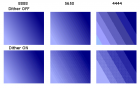
Even in 8888 you will se a lot of lines and points if there is a transparent texture on top of other objects.
The 16 bit mode will free a lot of VRAM and make the game run faster if you are using the TV out mode (720x480). In normal mode (480x272), i'm sure most games will run at 30-60 fps as usual.
Also most games will look better without filter, even at 16 bit (in my opinion). Just look at lego indiana jones, you will agree the image looks terrible with the filter:

The code to change the screen mode looks like this:
I was thinking... With this lines you define the screen size, it might be possible to force other screen modes like TV_OUT, just an idea.
Well, back to the 60 fps unlock, i'm going to read the tutorial and try to unlock mercury meltdown.
EDIT: ups I can't use Kabuto_Kun method with mercury meltdown, it is always running at 30 FPS.
, i'll try to unlock more games.I don't know any other way to activate the dither.
(01-05-2016, 12:51 AM)Kabuto_Kun Wrote: "Technical" info:
According to some user from a different forum, the dither effect on PSP "It is done to save VRAM so that more textures can be loaded and helps to keep higher fram rate...
I helped coding a lua interpreter (onelua) and i discovered a few things about PSP and the GU_DITHER effect. The filter itself does not save any VRAM, it is the screen mode what saves VRAM.
This may look like a bit exaggerated, but the image can be that bad, even worst if you use a TV_OUT cable:
Even in 8888 you will se a lot of lines and points if there is a transparent texture on top of other objects.
The 16 bit mode will free a lot of VRAM and make the game run faster if you are using the TV out mode (720x480). In normal mode (480x272), i'm sure most games will run at 30-60 fps as usual.
Also most games will look better without filter, even at 16 bit (in my opinion). Just look at lego indiana jones, you will agree the image looks terrible with the filter:
The code to change the screen mode looks like this:
Code:
u32 Screen_Mode  = GU_PSM_4444; // 8888(32bit), 5650-5551(16bit), 4444(12bit).
	// Setup GU
	void* fbp0 = getStaticVramBuffer(BUF_WIDTH,SCR_HEIGHT,Screen_MODE);
	void* fbp1 = getStaticVramBuffer(BUF_WIDTH,SCR_HEIGHT,Screen_MODE);
	void* zbp = getStaticVramBuffer(BUF_WIDTH,SCR_HEIGHT,GU_PSM_4444); //Allways 4444

	sceGuInit();
	sceGuStart(GU_DIRECT,list);
	sceGuDrawBuffer(Screen_MODE,fbp0,BUF_WIDTH);
	sceGuDispBuffer(SCR_WIDTH,SCR_HEIGHT,fbp1,BUF_WIDTH);
        .
        .
        .
I was thinking... With this lines you define the screen size, it might be possible to force other screen modes like TV_OUT, just an idea.
Well, back to the 60 fps unlock, i'm going to read the tutorial and try to unlock mercury meltdown
.EDIT: ups I can't use Kabuto_Kun method with mercury meltdown, it is always running at 30 FPS.