Posts: 168
Threads: 8
Joined: Apr 2017
Reputation:
8
That's really weird, like I noted before, this seems to be a problem caused by a difference, like bad ISOs. I'd have to gather a copy of that ISO, and make new textures just for this one bad iso, but well, I don't have it.
The font for talking to people in worlds hasn't been tinkered with.
I'm pretty sure I already posted on GitHub, but if someone wants to contact me, just hit me, AkiraJkr#6764
Posts: 38
Threads: 0
Joined: Jun 2013
Reputation:
0
I don't think my .iso is bad, but it doesn't really matter, it's so minor.
I hope you can do the textbox font soon.
I have a friend who I'd like to introduce to BBS, and they're starting in a few months.
All further work is appreciated.  Thanks.
Posts: 168
Threads: 8
Joined: Apr 2017
Reputation:
8
07-12-2018, 02:36 PM
(This post was last modified: 07-19-2018, 01:11 PM by AkiraJkr.)
I can try grabbing this .iso and providing a fix for those who aren't using the correct iso, since it seems like half the people who download this have the problem. I just have to know where to get it. Which I don't.
If you could hit my Discord for that, go ahead.
Also the creator of the fonts was hououin_kyouma. Same guy from the Persona 3 Portable project. What I mean is, I don't know if I can get the textboxes done.
----------------------------------------------------
So, I checked the version that Parallaxed(?) was having issues with, and the menus are working just fine for me. Perhaps it must be a error in the emulator, or you need to update.
Posts: 2
Threads: 0
Joined: Aug 2018
Reputation:
0
How do you install this on Mac?
Posts: 168
Threads: 8
Joined: Apr 2017
Reputation:
8
I have no idea. I'm no Mac user. But I'd assume the process is similar, but more convoluted. I can't help you my friend, the best tip I can give you is: Put the textures at the PSP/TEXTURES/ULJM05775. That's all I know. It should automatically work if you didn't disable Replace textures.
Posts: 2
Threads: 0
Joined: Aug 2018
Reputation:
0
08-25-2018, 12:41 AM
(This post was last modified: 08-25-2018, 12:42 AM by mood.fm.)
Is there any way to replace the opening cutscene with the one from 2.5?
Posts: 168
Threads: 8
Joined: Apr 2017
Reputation:
8
That would require patching the game with that cutscene, which I have no experience with.
Posts: 1
Threads: 0
Joined: Sep 2018
Reputation:
0
When i downloaded the link off github, it says that the archive is corrupted.
Posts: 38
Threads: 0
Joined: Jun 2013
Reputation:
0
10-24-2018, 06:34 AM
(This post was last modified: 10-24-2018, 07:09 AM by Devina.)
In case anyone wants, I made some small tweaks.
They're a cutscene font disabler (because the subtitles are off due to the translation patch; people often say things in the game but the subtitles don't cover it, making it feel weird). The two transparent files go in the Font folder. An example of this is 5:03 in this vid:
https://youtu.be/bJGY8rsxUzo?t=300
Also, smaller battle portraits for Terra and Ventus (Aqua is fine). Ventus is pretty fine too, but I included a smaller one just in case. Terra's battle portrait is RIDICULOUSLY BIG and his hair blocks the health, which is bad when you first start out as you can't tell how much health you have. Goes in UI > Terra/Ventus folder.
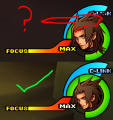
If you want to use Ventus' smaller portrait, rename VNormal Portrait to just Normal Portrait. I did that so it would fit into this post as you can't have two filenames.
Font part 1 (transparent pic)
Filename should be:
09c240605b9cd1bf3325e715

Font part 2 (transparent pic)
Filename should be:
09c24060016ad0513325e715

Terra
Filename should be:
Normal Portrait

Ventus
Filename should be:
Normal Portrait

Posts: 168
Threads: 8
Joined: Apr 2017
Reputation:
8
Nice tweaks there. Though I'm not changing/including anything to maintain accuracy, I found it weird, but their battle portraits really are that size. Well, who likes them like this better will enjoy it. Also the Font alternative is pretty sweet, since using the subtitle disabler cheat often breaks in-game dialogue.
(09-01-2018, 06:09 PM)travistu8 Wrote: When i downloaded the link off github, it says that the archive is corrupted.
I...don't know what to do about that. It's working fine for me. Maybe GitHub was borked when you were downloading.
Posts: 1
Threads: 0
Joined: Oct 2016
Reputation:
0
Your patch for Aqua is awesome, is there any way it could work on a PAL iso?
Posts: 168
Threads: 8
Joined: Apr 2017
Reputation:
8
That'd require me having to create a patch just for it, which at the moment, am too busy to do at the moment. Perhaps at the half of next month.
Posts: 1
Threads: 0
Joined: Dec 2018
Reputation:
0
Hello. When I use the Japanese voices code, I can hear Japanaese voices in cutscenes but the gameplay voices are mute. Was I suppose to download Japanese voices from somewhere or something?
Posts: 168
Threads: 8
Joined: Apr 2017
Reputation:
8
(12-14-2018, 10:23 PM)ImmaXehanort Wrote: Hello. When I use the Japanese voices code, I can hear Japanaese voices in cutscenes but the gameplay voices are mute. Was I suppose to download Japanese voices from somewhere or something?
I don't think that the Final Mix version was supposed to have Japanese voices in gameplay, so yeah...there you go.
Posts: 1
Threads: 0
Joined: Jan 2019
Reputation:
0
Awesome work, makes the game look beautiful.
Unfortunately it introduces annoying audio stutter when I have it installed. Example: YouTube link
It's a long shot, but does anyone have any ideas how to fix this?
On PC, my specs:
Intel i5-4440
8 GB RAM
GTX 970
|



