Posts: 1,795
Threads: 17
Joined: Sep 2013
Reputation:
158
@Boondock Saint you should probably open a separate thread for Yuusha 30 Second(and yea it's "second" not "seconds";p), either way your save works fine here, so it's probably a fan translation bug or issue with patching.
http://forums.ppsspp.org/showthread.php?tid=6594 - Custom PPSSPP Shaders!
http://forums.ppsspp.org/showthread.php?tid=3590&pid=117172#pid117172 - simple CE scripts to help creating CWCheats,
https://github.com/LunaMoo/PPSSPP_workarounds - CWCheat workarounds.
Posts: 5,371
Threads: 14
Joined: Mar 2013
Reputation:
303
Done

♦ Intel Core i7-6700HQ | 16 GB RAM | NVIDIA GeForce GTX 960M | Debian Testing
♦ Intel Core i7-2630QM | 4 GB RAM | NVIDIA GeForce GT 540M | Debian Testing
♦ PSP-3004 | 6.60 PRO-C2
Posts: 383
Threads: 8
Joined: Mar 2014
Reputation:
3
Still stuck? Try using older PPSSPP version (Im using 1.1.1-28)
The game is so freaking fun XD
Old laptop: Lenovo G458
AMD/ATI Radeon HD 7310 | 1366x768@60Hz | APU E1-1200 Dual Core | 2.5 GB DDR3 400MHz | Windows 7 Home Premium 32-bit
New laptop: Lenovo ideapad 100
Nvidia Geforce 920M 2GB / Intel HD Graphics 5500 | 1366x768@60Hz | Intel Core i3-5005U 2GB | 2GB DDR3 2000MHz | Window 10 Home 64-bit
Posts: 60
Threads: 13
Joined: Feb 2015
Reputation:
1
Has anyone been able to get the DLC to work? I have it in the /GAME folder, same as all the other DLC, yet nothing shows up in the map editor.
Posts: 1,795
Threads: 17
Joined: Sep 2013
Reputation:
158
Works fine here:
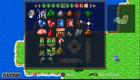
make sure you have 2 dlc files(PARAM.PBP and DLC01.EDAT) inside "memstick\PSP\GAME\ULJS00332".
Location of memstick might differ depending on platform, your own choice or even folder write/access priviledges.
http://forums.ppsspp.org/showthread.php?tid=6594 - Custom PPSSPP Shaders!
http://forums.ppsspp.org/showthread.php?tid=3590&pid=117172#pid117172 - simple CE scripts to help creating CWCheats,
https://github.com/LunaMoo/PPSSPP_workarounds - CWCheat workarounds.
Posts: 1,795
Threads: 17
Joined: Sep 2013
Reputation:
158
Yeah well dlc add's 4 tilesets(the last 4 green icons there).
As for the filter, just used example upscaling preset from my overgrown customizable shader. It's basically slightly colored 5xBR-lv2/accuracy. If you don't care about messing with color and other changes, any fairy recent version of PPSSPP from
buildbot includes the same base filter.
http://forums.ppsspp.org/showthread.php?tid=6594 - Custom PPSSPP Shaders!
http://forums.ppsspp.org/showthread.php?tid=3590&pid=117172#pid117172 - simple CE scripts to help creating CWCheats,
https://github.com/LunaMoo/PPSSPP_workarounds - CWCheat workarounds.





