Title: Kameleon Disc ID: ULES00369 Genre: Puzzle Region: EUR Format: ISO Version: PPSSPP 0.9.1-41 x64+x86 OS: Windows 7 64 bit Compatibility: ingame Notes: With the OpenGL backend the game shows only the Star Fish (picture 1) logo at start, after that only a black screen. The game continues in the background though, pressing buttons works; no GFX changes but sound and music.
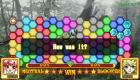
The software renderer works seemingly correct (pictures two and three) but very slow.
I'm sorry, but I can't constantly keep an eye on all the game compatibility threads I started.
Please send a Private Message if you need some more information.
● If you report (or happen to find any) game/mini/demo that's still not on the compatibility list yet even after 48 hours, you can PM me the link!
● Sorry for my bad english, I'm Indonesian.
9.5 - 803 Winx64, no changes.
Same behaviour as in the first post: playable(very slow) with software rendering.
I'm sorry, but I can't constantly keep an eye on all the game compatibility threads I started.
Please send a Private Message if you need some more information.
9.8 - 561 Win x86, almost no changes.
Almost the same behaviour as in the first post: playable(very slow) with software rendering but now with added and annoying flickering during software rendering.
I'm sorry, but I can't constantly keep an eye on all the game compatibility threads I started.
Please send a Private Message if you need some more information.
09-28-2014, 04:22 PM (This post was last modified: 09-28-2014, 07:17 PM by Tabman.)
9.9.1 - 541 Win7 x64
OpenGL has only a black screen, the game runs in the background though.
DX9 shows the game very small on a black screen, see picture. Interestingly, the screenshot function of ppsspp wasn't able to take a picture on DX9, I had to do it manually.
I'm sorry, but I can't constantly keep an eye on all the game compatibility threads I started.
Please send a Private Message if you need some more information.







 Kameleon_x64.zip (Size: 5.25 KB / Downloads: 1,064)


