| Welcome, Guest |
You have to register before you can post on our site.
|
| Forum Statistics |
» Members: 20,378
» Latest member: SaturnRing
» Forum threads: 14,256
» Forum posts: 118,691
Full Statistics
|
| Online Users |
There are currently 2009 online users.
» 0 Member(s) | 2006 Guest(s)
Applebot, Baidu, Google
|
| Latest Threads |
Yu-Gi-Oh! Arc-V Tag Force...
Forum: CWCheat codes
Last Post: JinxMaster95
2 hours ago
» Replies: 37
» Views: 487,028
|
CwCheat Support
Forum: CWCheat codes
Last Post: jackduhripper
3 hours ago
» Replies: 1,110
» Views: 5,721,224
|
[ULES01183] Yu-Gi-Oh GX T...
Forum: Texture Packs
Last Post: Josivrau
7 hours ago
» Replies: 1
» Views: 316
|
Monster Hunter Freedom Un...
Forum: CWCheat codes
Last Post: Kaidou
10-29-2026, 08:20 PM
» Replies: 128
» Views: 1,356,064
|
Error code 8002013a
Forum: Ad-Hoc Multiplayer
Last Post: AlexKoragon
10-21-2026, 12:28 AM
» Replies: 0
» Views: 74
|
Error code 8002013a
Forum: Ad-Hoc Multiplayer
Last Post: AlexKoragon
10-20-2026, 09:16 PM
» Replies: 0
» Views: 68
|
Error code 8002013a
Forum: Ad-Hoc Multiplayer
Last Post: AlexKoragon
10-20-2026, 09:12 PM
» Replies: 0
» Views: 60
|
Dissidia 012: Duodecim Fi...
Forum: Playable Games
Last Post: MatNyaga
10-20-2026, 09:17 AM
» Replies: 1,103
» Views: 4,270,632
|
60 FPS Patches Master Lis...
Forum: CWCheat codes
Last Post: Fran535
10-17-2026, 10:27 AM
» Replies: 116
» Views: 2,373,728
|
Valkyria Chronicles 3 Ext...
Forum: Texture Packs
Last Post: chrome99001
10-15-2026, 02:19 PM
» Replies: 22
» Views: 70,036
|
|
|
| Character not moving (Persona 2 : IS) |
|
Posted by: DuckyDanky - 12-02-2019, 05:36 PM - Forum: General Discussion and Announcements
- No Replies
|
 |
Hey! So uh I've been playing Persona 2 Innocent sin yesterday, everything goes well until the first dungeon. For some reason my character decides to not move, despite using my controller, and the keyboard, he just doesn't move, despite all other buttons working, which is really annoying, so I tried to restart a new game, but as soon as I entered the first area (The school) I can't move again, so I was wondering how to fix this, if possible, and if it happens in other games as well. Thanks in advance.
|

|
|
| Issues with Pump it Up Exceed on PPSSPP |
|
Posted by: MattDeRac - 11-28-2019, 12:31 PM - Forum: General Discussion and Announcements
- No Replies
|
|
Hi, I downloaded a rom that is Pump it Up Exceed and I have found some issues that need to be fixed, When I start one of the modes it sometimes crashes the emulator for no reason, and when I tried to play some specific songs and finished them, it also crashes the emulator like I said before,
The songs I talking about that crashes the emulator are these ones
Final Audition 3 UF
Pump Me Amadeus
I Love You Baby
The Rap Act 3
Shake it Up
Fiesta
Born to be alive
And La Cubanita
I'm also trying to find cheats for Pump it Up Exceed but there is none.
Can someone explain the whole issue about the random crashes in Pump it Up Exceed on PPSSPP? I really want these issues for the rom to be fixed. Thanks.
-Matt
|
|
|
|
| Changing PPSSP font. |
|
Posted by: DuckyDanky - 11-25-2019, 11:30 PM - Forum: General Discussion and Announcements
- Replies (1)
|
|
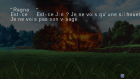
Hello there, I'm pretty new using PPSSPP, and honestly, so far I'm liking it! The game I tried works really well, but the problem is, the text kinda looks bad and often cuts off, I'm pretty sure this has been talked about a thousand times but I couldn't find anything helpful. So I was just wondering how to change the font to the original PSP, or just a one that looks and fits better. Here's how it looks like, image from Blazblue Calamity trigger. So yeah, any help is appreciated, and I kinda suck with tweaking files and stuff like that so if you could all that well would be very nice. Thanks in advance.
|
|
|
|
| How to unpack content of UMD image |
|
Posted by: Junisha1 - 11-22-2019, 06:52 PM - Forum: General Discussion and Announcements
- No Replies
|
|
Hello everyone,,,i have a general question. I want to examine the contents of a PSP game.
The Image i have is in ISO format, which i can simply look into by double clicking it in my Windows 10 explorer.
Inside i see some small files but one who gets my attraction, it is called "ROCKY6.BIG". This file is about 400 MB in size and i suspect that it contains the game itself.
Further inspection with HxD Hexeditor shows "[ GEAR BigFile ]" as first bytes, which may be some sort of magic-bytes.
I then search the net to find infos for this type of file. Only one tool, the Dragon Unpacker, in combination with a special script was able to unpack the stream into single files. All tools handling BIG file extenion where not able to unpack this.
The files are named with hex-names and have extensions like .wav, .dat, .xml and such.
I then tried to play those wav files, but no success. The file signature is RIFF...WAVE... but it seems to have the waveforms coded in an unusual manner.
Now i'm stuck and wonder how those wav files can be decoded and played. I tried to import them with Audacity as raw data as 8 bit mono 44khz but it only plays noise.
Can someone please give me some hints how to go on from here!?
What is this special Gear Bigfile and how to deal with it?
How can i find out the right codec of those wav files?
Where are the graphics objects or 3D models in?
Thanks a lot, from an absoute beginner....
|
|
|
|
|


