| Welcome, Guest |
You have to register before you can post on our site.
|
| Online Users |
There are currently 2808 online users.
» 0 Member(s) | 2803 Guest(s)
Applebot, Baidu, DuckDuckGo, Google, Yahoo!
|
| Latest Threads |
PPSSPP - Need help with e...
Forum: General Discussion and Announcements
Last Post: Just_Dom
9 hours ago
» Replies: 0
» Views: 70
|
Dead or Alive Paradise UL...
Forum: CWCheat codes
Last Post: Gameshark
Today, 07:35 AM
» Replies: 0
» Views: 74
|
PPSSPP - Outrun Coast 2 C...
Forum: CWCheat codes
Last Post: Gameshark
Today, 07:09 AM
» Replies: 3
» Views: 6,059
|
Smash Court Tennis 3 UCES...
Forum: CWCheat codes
Last Post: Gameshark
Today, 07:05 AM
» Replies: 0
» Views: 70
|
Yu-Gi-Oh! Arc-V Tag Force...
Forum: CWCheat codes
Last Post: JinxMaster95
Today, 01:54 AM
» Replies: 41
» Views: 487,618
|
Persona 2 Eternal Punishm...
Forum: Texture Packs
Last Post: emuTronez
Today, 12:39 AM
» Replies: 25
» Views: 60,447
|
Persona 2 - Innocent Sin ...
Forum: Texture Packs
Last Post: Ravender22
Today, 12:35 AM
» Replies: 86
» Views: 269,574
|
CwCheat Support
Forum: CWCheat codes
Last Post: jackduhripper
10-31-2026, 09:24 PM
» Replies: 1,110
» Views: 5,724,704
|
[ULES01183] Yu-Gi-Oh GX T...
Forum: Texture Packs
Last Post: Josivrau
10-31-2026, 04:57 PM
» Replies: 1
» Views: 520
|
Monster Hunter Freedom Un...
Forum: CWCheat codes
Last Post: Kaidou
10-29-2026, 08:20 PM
» Replies: 128
» Views: 1,356,456
|
|
|
| PPSSPP not showing folder of ISOs |
|
Posted by: LoneStarr - 12-29-2015, 07:14 PM - Forum: General Discussion and Announcements
- Replies (1)
|
 |
Hi there,
on both Windows and Android, the Program doesn't seem to natively show the folder, where the ISOs are. I tried several locations, but whichever I put the ISOs in - This would be the one folder, that the Program doesn't show. As if the folder didn't exist.
On Windows I can click on "Browse" and then the Standard Windows Explorer would show up and then I am able to find the right folder and play the games. They also would show up in "Recently Played" after I finished.
On Android I don't have a Browse option and the App doesn't see the ISO folder natively.
Any help appreciated. Using the most recent Version on both Windows and Android (ZTE Blade L3 Android 5.0.1 Lollipop)
Thanks
|

|
|
| Frame rate issues |
|
Posted by: clstew32559 - 12-25-2015, 06:29 PM - Forum: General Discussion and Announcements
- No Replies
|
|
This may have been posted originally but I'm not sure. I'm having slow down issues on certain games like Tekken 6 and Force Unleashed. trying to figure out how to get them going properly. Any suggestions would be appreciated.
|
|
|
|
| hi all, Problem with the rendering |
|
Posted by: LordLL - 12-24-2015, 02:42 PM - Forum: General Discussion and Announcements
- Replies (2)
|
|
Like title said, the 1:1 rendering resolution look the exact same of 10x (Even if the game fps go down down town.) *cry*. i tried everything and searched for 3 hour. I don't know what happen. i even tried to change Version of emulator "from 1.0.1 to 1.1.0" . nothin. If someone can help me , that would count as a present. i tried with all games i have but nothin. this morning was working correctly T:
*first time writing on a forum. sorry if i missed somenthing.*
Bump? T:
Bump and hope u got an happy holiday.
|
|
|
|
| [Solved] MHFU DLC ? |
|
Posted by: Gankfest - 12-24-2015, 12:45 AM - Forum: General Discussion and Announcements
- Replies (2)
|
 |
Read and completed this guide here:
://forums.ppsspp.org/showthread.php?tid=5476
Got the first 6 event quests and bonus items. When I complete those 6 quests, can I run the same method, and get the next 6 quests, etc... Until I've completed all the event and challenge quests?
Thanx, was a bit confused on that part.
Does no one know, or am I not explaining myself properly?
|
|
|
|
| "PPSSPP has stopped working." |
|
Posted by: Riosthename - 12-22-2015, 04:26 PM - Forum: General Discussion and Announcements
- No Replies
|
|
I played a fair share of monster hunter freedom unite using PPSSPP, but for some reason, it ceases to work. Immediately on startup, it gives me the message: "PPSSPP has stopped working."
My operating system is Windows 7, 64 bit. My processor is: Intel® Core™ i5-4210M CPU @ 2.60GHz (4CPUs), ~2.6 GHz
I have updated my drivers, so I don't believe that is the problem.
Again, ppsspp DID work before, yet somehow it isn't anymore. I've been searching, and searching for a way to fix this problem, but to no avail.
I booted up GPU-Z, so you can look at the drivers from there, if you like.
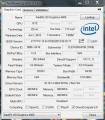
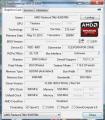
Thank you for any help.
|
|
|
|
|


 Why is this happening?

 )


