Posts: 2
Threads: 0
Joined: Mar 2013
Reputation:
0
Hey this also runs on android as well and lets you save.
Posts: 522
Threads: 15
Joined: Mar 2013
Reputation:
9
Argh,why i have delete this games before,very hard to download this games.
my sub weapon:
xperia mini hd
1ghz scorpion
single core
not clocked
my ultimate weapon
acer(laptop)
2.2ghz ?core
intel media accelarator 3000
i'm a tester,but not as good as other,please be kind with me,haha.
Posts: 2
Threads: 0
Joined: Apr 2013
Reputation:
0
Download the lastest build, it enables in game save and quick save, quick save takes a while though. However there is still no audio
Posts: 3
Threads: 0
Joined: Apr 2013
Reputation:
0
04-23-2013, 11:24 AM
(This post was last modified: 04-23-2013, 01:48 PM by judai.)
Excuse me but I try v0.7.6-2 on my galaxy Ace2 and still can't save.
Give me some advice please.
Edit: I try a window ver. it can save normally ,but why on android can't save.T T
Posts: 8
Threads: 0
Joined: Jun 2013
Reputation:
0
I would also want to confirm together that in Windows, using a dev build, with the DLL, I can play the game smoothly, with voice, with sound with movie.
GREAT
I have only tried the first mission though, lol. I am busy play Super Robot Taisen Z2
Posts: 23
Threads: 1
Joined: Dec 2012
Reputation:
2
06-16-2013, 11:12 AM
(This post was last modified: 06-16-2013, 11:14 AM by Tsuruga.)
Anyone Experienced the save bug? Sometimes when I want to save I can save normally but at other times when I want to save the ppsspp says this error "cannot load png image save" and then it stopped working. Anyone with this issue?
I'm using PPSSPP 0.7.6 r1405 with default setting
Experienced in the older builds too
At3 is enabled.
My Rig:
Intel Core i5-4690 3.5Ghz
Gigabyte H97 Gaming 3
MSI Geforce GTX 960 2048MB DDR5 - Gaming 100ME - Limited Edition
8GB DDR3
Windows 10 Pro 64 Bit (Build 14393)
Posts: 78
Threads: 5
Joined: Jun 2013
Reputation:
0
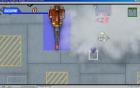
It works almost perfectly on the latest builds, apart from occasional sound crackle, and one very annoying problem, that you cannot see your movement range, as that particular layer doesnt render at all. Seems to be a very minor thing to hunt down, so it will probably be fixed soon. Hopefully.
Posts: 12
Threads: 1
Joined: Jun 2013
Reputation:
0
07-03-2013, 03:32 AM
(This post was last modified: 07-03-2013, 12:20 PM by RayOfSpeed.)
I haven't been having the save bug; mine has *super* crackly-sound and it tends to crash if you do much of anything while the sound is crackling. That's probably more to do with my hardware, though.
EDIT: sound issue is only on menu; my current fix is to save as early and as often as possible.
Posts: 6
Threads: 1
Joined: Jul 2013
Reputation:
0
07-16-2013, 10:10 AM
(This post was last modified: 07-16-2013, 10:11 AM by madmaxmadog.)
I have a slight problem in this game (been having it in every release i downloaded ) when you move a unit you get its movement range... the problem is I can't see the movement range...just support weapon range and other less important stuff. The iso is not the problem since the game works perfectly on my psp (using the emulator because of the bigger screen and savestates). I tried a lot of the graphics options (since these solved the exact same problem in srwz2.2) but to no avail.. If anyone has the same problem or has any advice please help. Much appreciated.