Posts: 997
Threads: 72
Joined: Jun 2013
Reputation:
17
07-21-2013, 02:47 PM
(This post was last modified: 07-21-2013, 02:49 PM by vsub_.)
Request.
Disable the "Delete Game" and maybe "Delete Save Data" in the newui while using the PC version of ppsspp.
Is there is actually any point of having them while using ppsspp on pc...maybe some option in the ini that when it's set to true,to enable those menus or just remove them from the pc version of ppsspp.
When I'm at the game page I always think that I'll accidentally click on some of those buttons and delete the game\save data(almost impossible to happen)...I know that there is a confirmation page.
Using PPSSPP on Windows 7 x64 SP1
i7 4771 3.5Ghz,GTX750TI,16GB RAM
Batch iso <=> cso converter
http://forums.ppsspp.org/showthread.php?tid=5384
Save Game\States Manager
http://forums.ppsspp.org/showthread.php?tid=5516
Posts: 6
Threads: 0
Joined: Jun 2013
Reputation:
0
There should be an option to put the FPS/VPS counter on the title bar. And I think is too soon to be askiing for this but, a TAS interface and movie recording support would be super.
Posts: 13
Threads: 1
Joined: Jul 2013
Reputation:
0
(07-21-2013, 06:37 PM)BaalZebub Wrote: There should be an option to put the FPS/VPS counter on the title bar. And I think is too soon to be askiing for this but, a TAS interface and movie recording support would be super. Also would like TAS along with internal AVI support
Posts: 109
Threads: 8
Joined: Apr 2013
Reputation:
3
07-21-2013, 08:17 PM
(This post was last modified: 07-21-2013, 08:21 PM by xZabuzax.)
(07-21-2013, 02:47 PM)vsub_ Wrote: Request.
Disable the "Delete Game" and maybe "Delete Save Data" in the newui while using the PC version of ppsspp.
Is there is actually any point of having them while using ppsspp on pc...maybe some option in the ini that when it's set to true,to enable those menus or just remove them from the pc version of ppsspp.
When I'm at the game page I always think that I'll accidentally click on some of those buttons and delete the game\save data(almost impossible to happen)...I know that there is a confirmation page.
I agree with this, my little cousin will definitely delete the games or the saves with that option inside the emulator.
Please add an option to disable that.
[CPU]: Intel Core i7-4790K 4.0GHz
[GPU]: EVGA GeForce GTX 970 Superclocked ACX 2.0 4GB GDDR5
[PSU]: EVGA SuperNOVA G1 1000W (80 Plus Gold)
[RAM]: Corsair Vengeance 16GB (2x8GB) DDR3 1600MHz
[MOBO]: MSI Z97-GAMING 5
[PC CASE]: ENERMAX Ostrog GT (Red)
[CPU FAN]: Cooler Master: Hyper 212 EVO
Posts: 181
Threads: 3
Joined: Jun 2013
Reputation:
3
#add wiimote support or ps3 controller for ios like psx4all
Experimenting with adhoc over internet system through Amultios custom ppsspp fork, find me in game
Monster Hunter Freedom : Lucis
Monster Hunter Freedom Unite : Lucis
Monster Hunter Portable 3rd: Lucis
Posts: 24
Threads: 1
Joined: Jul 2013
Reputation:
1
It's great if ppsspp can implement Ambient Occlusion and bloom/glow effect..
and add to set hard button for HH.
Thank you for creating this emulator...
Sorry for my english.
Sorry for my english, I'm from Indonesia
Posts: 631
Threads: 24
Joined: Apr 2013
Reputation:
16
07-22-2013, 12:57 PM
(This post was last modified: 07-22-2013, 12:57 PM by arg274.)
(07-21-2013, 06:40 PM)peronmls Wrote: (07-21-2013, 06:37 PM)BaalZebub Wrote: There should be an option to put the FPS/VPS counter on the title bar. And I think is too soon to be askiing for this but, a TAS interface and movie recording support would be super. Also would like TAS along with internal AVI support
What is this 'TAS'?
Updated
Contact::::
I don't exist anymore, no use calling a dead person
Posts: 997
Threads: 72
Joined: Jun 2013
Reputation:
17
(07-22-2013, 12:57 PM)arg274 Wrote: What is this 'TAS'? http://en.wikipedia.org/wiki/Tool-assisted_speedrun
Using PPSSPP on Windows 7 x64 SP1
i7 4771 3.5Ghz,GTX750TI,16GB RAM
Batch iso <=> cso converter
http://forums.ppsspp.org/showthread.php?tid=5384
Save Game\States Manager
http://forums.ppsspp.org/showthread.php?tid=5516
Posts: 5,371
Threads: 14
Joined: Mar 2013
Reputation:
303
(07-22-2013, 01:20 PM)vsub_ Wrote: (07-22-2013, 12:57 PM)arg274 Wrote: What is this 'TAS'? http://en.wikipedia.org/wiki/Tool-assisted_speedrun
But the real question is "What is this TAS interface of which BaalZebub talked about ?"... What does he mean ?
♦ Intel Core i7-6700HQ | 16 GB RAM | NVIDIA GeForce GTX 960M | Debian Testing
♦ Intel Core i7-2630QM | 4 GB RAM | NVIDIA GeForce GT 540M | Debian Testing
♦ PSP-3004 | 6.60 PRO-C2
Posts: 2,392
Threads: 27
Joined: Mar 2013
Reputation:
91
07-22-2013, 07:43 PM
(This post was last modified: 07-22-2013, 07:44 PM by TheDax.)
Probably something like this:
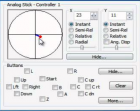
A little window that lets you pause, resume, play, set controls, etc., for every frame the game executes.
4GHz AMD 3900X, 32GB DDR4 RAM, 6GB Nvidia RTX 2060, Asus Crosshair 7 Hero (Wifi), Linux
How to ask useful questions: https://web.archive.org/web/20110214010944/http://support.microsoft.com/kb/555375
I'm not Dark_Alex, nor do I claim to be. Our nicknames are merely coincidence.
Posts: 5,371
Threads: 14
Joined: Mar 2013
Reputation:
303
(07-22-2013, 07:43 PM)daxtsu Wrote: Probably something like this:
A little window that lets you pause, resume, play, set controls, etc., for every frame the game executes.
Hmm... OK 
Does somebody know if this tool has already been added in any emulator ?
♦ Intel Core i7-6700HQ | 16 GB RAM | NVIDIA GeForce GTX 960M | Debian Testing
♦ Intel Core i7-2630QM | 4 GB RAM | NVIDIA GeForce GT 540M | Debian Testing
♦ PSP-3004 | 6.60 PRO-C2
Posts: 2,880
Threads: 111
Joined: Dec 2012
Reputation:
45
How work the new options: Read Framebuffer to Memory CPU/GPU? Well, I think the framebuffer go be processed by the memory of GPU or CPU, but have many issues and is much slow. I would like to know how it work, because English not is my native language and I can't understand well what is written.
Phones: Poco F3 8GB/256GB (Snapdragon 870 5G) and Redmi Note 6 Pro 4/64GB (Snapdragon 636)
PC: AMD Ryzen 5 3600 / 16GB RAM DDR4 3600MHz / NVIDIA GTX 1660 Ti 6GB / Windows 10 Pro
Posts: 2,392
Threads: 27
Joined: Mar 2013
Reputation:
91
07-22-2013, 08:07 PM
(This post was last modified: 07-22-2013, 08:07 PM by TheDax.)
That question would be better asked in the "Options explained" topic, no?
@vnctdj: That screenshot was from an input plugin for Mupen64.
4GHz AMD 3900X, 32GB DDR4 RAM, 6GB Nvidia RTX 2060, Asus Crosshair 7 Hero (Wifi), Linux
How to ask useful questions: https://web.archive.org/web/20110214010944/http://support.microsoft.com/kb/555375
I'm not Dark_Alex, nor do I claim to be. Our nicknames are merely coincidence.
Posts: 2,880
Threads: 111
Joined: Dec 2012
Reputation:
45
Oh, many sorry 
Phones: Poco F3 8GB/256GB (Snapdragon 870 5G) and Redmi Note 6 Pro 4/64GB (Snapdragon 636)
PC: AMD Ryzen 5 3600 / 16GB RAM DDR4 3600MHz / NVIDIA GTX 1660 Ti 6GB / Windows 10 Pro
Posts: 5,371
Threads: 14
Joined: Mar 2013
Reputation:
303
07-22-2013, 08:12 PM
(This post was last modified: 07-23-2013, 03:28 PM by vnctdj.)
(07-22-2013, 08:07 PM)daxtsu Wrote: @vnctdj: That screenshot was from an input plugin for Mupen64.
Thanks for the information
So it's not integrated in the emulator given that it's a plugin, that can be interesting in order to avoid high files size since this tool is not used by a lot of people...
♦ Intel Core i7-6700HQ | 16 GB RAM | NVIDIA GeForce GTX 960M | Debian Testing
♦ Intel Core i7-2630QM | 4 GB RAM | NVIDIA GeForce GT 540M | Debian Testing
♦ PSP-3004 | 6.60 PRO-C2
|





