Posts: 26
Threads: 3
Joined: May 2013
Reputation:
0
I have 2 problems..
1. When im trying to rum PPSSPP on windows it doesnt run.. and this message will appear. "This application has failed to start because XINPUT1_3.ddl was not found. Re-installing the application may fix this problem.
2. In my android when im playing Kingdom of hearts birth by sleep. The screen is fully black..
I need help plz.. tnx
Posts: 24
Threads: 3
Joined: Apr 2013
Reputation:
3
(05-03-2013, 01:10 AM)iricecake Wrote: I have 2 problems..
1. When im trying to rum PPSSPP on windows it doesnt run.. and this message will appear. "This application has failed to start because XINPUT1_3.ddl was not found. Re-installing the application may fix this problem.
2. In my android when im playing Kingdom of hearts birth by sleep. The screen is fully black..
I need help plz.. tnx
For the windows error i think you need to reinstall directx9 or whatever version and for the birth by sleep just play with the configs until it works at some points if its a black screen its most likely a cutscene and you have to press start to skip the scene and if thats not the case like i said play with the options in the graphics sections you can pretty much solve both these issues on your own one by googling and one by playing around with the config of ppsspp
Posts: 2,880
Threads: 111
Joined: Dec 2012
Reputation:
45
I play KHBBS fine. Loock my video:
[video=youtube] http://www.youtube.com/watch?v=PXVCRf8z8Dk[/video]
Maybe can be your settings
Phones: Poco F3 8GB/256GB (Snapdragon 870 5G) and Redmi Note 6 Pro 4/64GB (Snapdragon 636)
PC: AMD Ryzen 5 3600 / 16GB RAM DDR4 3600MHz / NVIDIA GTX 1660 Ti 6GB / Windows 10 Pro
Posts: 522
Threads: 15
Joined: Mar 2013
Reputation:
9
if installing direct x9 doesn't work just get xinput1_3 on net and put the xinput1_3 in your ppsspp directory.
my sub weapon:
xperia mini hd
1ghz scorpion
single core
not clocked
my ultimate weapon
acer(laptop)
2.2ghz ?core
intel media accelarator 3000
i'm a tester,but not as good as other,please be kind with me,haha.
Posts: 26
Threads: 3
Joined: May 2013
Reputation:
0
05-04-2013, 05:37 AM
(This post was last modified: 05-04-2013, 05:49 AM by iricecake.)
tnx i already put xinput1_3 in my ppsspp directory but when i try to run ppsspp, the application automatically exit T.T
______________________
Sorry for my bad english ^_^V. I hope you understand  )
When im opening ppsspp a warning message will appear. I will click "Dont send" button and the application will close.. T.T
Posts: 24
Threads: 3
Joined: Apr 2013
Reputation:
3
05-04-2013, 09:56 PM
(This post was last modified: 05-04-2013, 09:58 PM by Sankareaftw.)
(05-04-2013, 05:37 AM)iricecake Wrote: tnx i already put xinput1_3 in my ppsspp directory but when i try to run ppsspp, the application automatically exit T.T
______________________
Sorry for my bad english ^_^V. I hope you understand )
When im opening ppsspp a warning message will appear. I will click "Dont send" button and the application will close.. T.T
I think you may have to place that dll in "C:\Windows\System32" not ppsspp
And if that still doesnt make it work just try installing the latest directx im pretty sure that should get it to work and if worse comes to worst i could Teamviewer you but id prefer that to be the last resort
Posts: 26
Threads: 3
Joined: May 2013
Reputation:
0
sankarea its still not working T.T
Posts: 24
Threads: 3
Joined: Apr 2013
Reputation:
3
05-05-2013, 05:03 AM
(This post was last modified: 05-05-2013, 05:06 AM by Sankareaftw.)
(05-05-2013, 04:38 AM)iricecake Wrote: sankarea its still not working T.T
So you tried placing it in system32 and/or reinstalling directx? hmm not quite sure what to do then cause that should have helped get it to work
"1. Click start button and click the "RUN" icon.
2. Type in “dxdiag"
3. A large window will appear. Your DirectX version should appear near the bottom of this window.
If the directX version is under 8.1 or your computer does not have one, please update the directX."
can you tell me the version yours is at or if the window even pops up?
sorry the person i copied that from didnt exactly know what they were saying the version will be in the center bottom area im sure you'd find it
Posts: 26
Threads: 3
Joined: May 2013
Reputation:
0
im using directx9, and i also search on net. and base on my research directx9 is the latest version for win xp.. I hope u can help me T.T
Posts: 522
Threads: 15
Joined: Mar 2013
Reputation:
9
try installing the whole package of directx9,10,11,hmm,i have the same problem before,but i just put the xinput in the directories(don't put in a folder,just put in the directory where the ppsspp exe) to shut it mouth,and it work perfectly,although i have to copy and paste if i'm downloading new git.and what the warning thing?could you show the screenshot?or describe the full detail about it.
my sub weapon:
xperia mini hd
1ghz scorpion
single core
not clocked
my ultimate weapon
acer(laptop)
2.2ghz ?core
intel media accelarator 3000
i'm a tester,but not as good as other,please be kind with me,haha.
Posts: 24
Threads: 3
Joined: Apr 2013
Reputation:
3
05-05-2013, 09:12 AM
(This post was last modified: 05-05-2013, 09:13 AM by Sankareaftw.)
(05-05-2013, 07:02 AM)aki21 Wrote: try installing the whole package of directx9,10,11,hmm,i have the same problem before,but i just put the xinput in the directories(don't put in a folder,just put in the directory where the ppsspp exe) to shut it mouth,and it work perfectly,although i have to copy and paste if i'm downloading new git.and what the warning thing?could you show the screenshot?or describe the full detail about it.
^ hes on xp this whole time i was thinking windows 7
iricecake i apologize; not sure if im allowed to post this link but im going to anyways and hope it remains and doesnt violate anything lol
" Directx 9c" just run that and it SHOULD fix it and if it doesnt then i doubt ill be any further help
Posts: 26
Threads: 3
Joined: May 2013
Reputation:
0
05-05-2013, 09:31 AM
(This post was last modified: 05-05-2013, 09:31 AM by iricecake.)
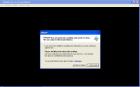
aki21 this is the warning that appears when im running ppsspp..
Posts: 24
Threads: 3
Joined: Apr 2013
Reputation:
3
(05-05-2013, 09:31 AM)iricecake Wrote: aki21 this is the warning that appears when im running ppsspp..
Does that error only occur with the dll in the folder or with it outside of the folder inside the system32 folder aswell?
Posts: 26
Threads: 3
Joined: May 2013
Reputation:
0
i try to put that xinput in system32 folder.. still not working..
and also create ppsspp folder and i extract all ppsspp files on it and i put xinput on that folder too, after that i try to run ppsspp again.. still not working T.T ..
Posts: 522
Threads: 15
Joined: Mar 2013
Reputation:
9
05-05-2013, 11:36 AM
(This post was last modified: 05-05-2013, 11:41 AM by aki21.)
(05-05-2013, 10:00 AM)iricecake Wrote: i try to put that xinput in system32 folder.. still not working..
and also create ppsspp folder and i extract all ppsspp files on it and i put xinput on that folder too, after that i try to run ppsspp again.. still not working T.T ..
hmm,i think the xinput problem has been solved?could you list your pc spec like driver,it might relate to driver i think,so give me your driver names.it might be opengl issue.
my sub weapon:
xperia mini hd
1ghz scorpion
single core
not clocked
my ultimate weapon
acer(laptop)
2.2ghz ?core
intel media accelarator 3000
i'm a tester,but not as good as other,please be kind with me,haha.
|