





(I'm trying the latest version now.. v1.1.1.8.7.2-g490c453 (windows) will post any changes..
No same deal.
Regular v1.1.1 has the issue as well.
I seem to have ran into this issue I believe only after updating to the latest version.. I could be wrong but never realized it until then. There is a prob when resizing the window if using OpenGL (This doesn't happen with directX). If you open the emu at say 2x window size, it'll start off displaying correctly. Now, if you resize the window from 2x > 3x or 1x you'll see what I've seen in these snapshots.
2x Starting window (OK - Normal)
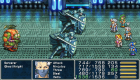
2x Starting window changed to 1x

2x Starting window changed to 3x

Any idea why this is? Any selected options I may have checked?
No same deal.
Regular v1.1.1 has the issue as well.
I seem to have ran into this issue I believe only after updating to the latest version.. I could be wrong but never realized it until then. There is a prob when resizing the window if using OpenGL (This doesn't happen with directX). If you open the emu at say 2x window size, it'll start off displaying correctly. Now, if you resize the window from 2x > 3x or 1x you'll see what I've seen in these snapshots.
2x Starting window (OK - Normal)
2x Starting window changed to 1x
2x Starting window changed to 3x
Any idea why this is? Any selected options I may have checked?