Posts: 6
Threads: 2
Joined: Nov 2014
Reputation:
0
01-26-2016, 01:09 PM
(This post was last modified: 01-29-2016, 04:23 PM by Shuyin76.)
oy, if it's true, that's really great !
In any case, I'll try when I can so I'll tell you after !
Edit : I just tested with PSP and PPSSPP, if the PSP hosts, it works but the connection is always lost after a quest. I'll re-edit when i can try with 2+ ppsspp !
Edit 2 : like the previous post said, using coldbird, you can't connect 3 players (1psp and 2 ppsspp) at the same time. But I tried with 2 person using the same personnal internet network and it seems to be conflicting on the coldbird server...
Posts: 6
Threads: 2
Joined: Nov 2014
Reputation:
0
02-03-2016, 08:51 PM
(This post was last modified: 02-04-2016, 04:36 PM by Shuyin76.)
(UP) And anyone know if patapon 2 works now without a psp ?
Posts: 6
Threads: 0
Joined: Mar 2016
Reputation:
0
Do I need to install something in my PSP to play with a PPSSPP?
I'm using prometheus as the adhoc server in my ppsspp, but when i open my cave at psp, PPSSPP dont find my cave, and the same goes to the oppost, any help?
Posts: 358
Threads: 13
Joined: Mar 2013
Reputation:
15
(03-11-2016, 04:21 PM)LucasxDsY Wrote: Do I need to install something in my PSP to play with a PPSSPP?
I'm using prometheus as the adhoc server in my ppsspp, but when i open my cave at psp, PPSSPP dont find my cave, and the same goes to the oppost, any help?
install PRO Online Client
http://forums.ppsspp.org/showthread.php?tid=8349
Posts: 6
Threads: 0
Joined: Mar 2016
Reputation:
0
I did that and my PSP stills cant find my PPSSPP cave
Posts: 358
Threads: 13
Joined: Mar 2013
Reputation:
15
03-12-2016, 03:54 PM
(This post was last modified: 03-12-2016, 03:54 PM by onelight.)
(03-12-2016, 10:12 AM)LucasxDsY Wrote: I did that and my PSP stills cant find my PPSSPP cave 1. check PRO Online Client is working or not
if it's working, push home will open pro online client menu

2. PPSSPP(PC not android) go to PSP cave.
Posts: 6
Threads: 0
Joined: Mar 2016
Reputation:
0
03-12-2016, 06:36 PM
(This post was last modified: 03-12-2016, 06:50 PM by LucasxDsY.)
It don't appear
I must have installed it the wrong way...
PS: when I'm in no game, in the PSP menu, when I click select appears a menu, but just when I'm not playing a game.
Posts: 358
Threads: 13
Joined: Mar 2013
Reputation:
15
03-12-2016, 07:09 PM
(This post was last modified: 03-12-2016, 07:11 PM by onelight.)
(03-12-2016, 06:36 PM)LucasxDsY Wrote: It don't appear
I must have installed it the wrong way...
PS: when I'm in no game, in the PSP menu, when I click select appears a menu, but just when I'm not playing a game.
copy pro online client to PSP memstick
ms0:/
---docs
---kd
---seplugins/
------game.txt
------atpro.prx
------hotspot.txt
------server.txt
If there are a wifi with named: wifi123, for example
add named to hotspot.txt
add the local ip of your PC to server.txt and delet what it has
add "ms0:/seplugins/atpro.prx 1" to gmae.txt (not included “ ”)
activat pro online client
PSP connceted the wifi at least once
in the PSP menu, click select to open PRO VSH menu
goto RECOVER MENU,
Enable GAME plugin
Disable Inferno & NP9660 ISOCache
Enable Force High Memory Layout
Enable atpro.prx[GAME]
RUN PPSSPP on your PC
Enable Wlan
IP address with the local ip of your PC (ex. 192.168.3.1)
Enable Built-in Adhoc Server (the server only working when game is running)
Posts: 6
Threads: 0
Joined: Mar 2016
Reputation:
0
03-12-2016, 09:32 PM
(This post was last modified: 03-12-2016, 11:02 PM by LucasxDsY.)
I just killed my PSP while doing that (i probably enabled something i shouldnt) ... first time the game didnt launch, it was all black, i restarded my PSP and unnistalled PR Firmware to see if I could start the game again.
The game started normally, i exited the game, went to the white memory card simbol, clicked, tried to start the flash verson or what it was, and it said the data was corrupted, i tried the one in the middle and my psp gone black, after that i could start my psp again, now it have the power light as green for aprox. 10 seconds while black screen and after that my PSP dies again.
Posts: 358
Threads: 13
Joined: Mar 2013
Reputation:
15
03-13-2016, 02:52 AM
(This post was last modified: 03-13-2016, 02:58 AM by onelight.)
(03-12-2016, 09:32 PM)LucasxDsY Wrote: I just killed my PSP while doing that (i probably enabled something i shouldnt) ... first time the game didnt launch, it was all black, i restarded my PSP and unnistalled PR Firmware to see if I could start the game again.
The game started normally, i exited the game, went to the white memory card simbol, clicked, tried to start the flash verson or what it was, and it said the data was corrupted, i tried the one in the middle and my psp gone black, after that i could start my psp again, now it have the power light as green for aprox. 10 seconds while black screen and after that my PSP dies again.
Try disable other Plugins, only enable atpro.prx
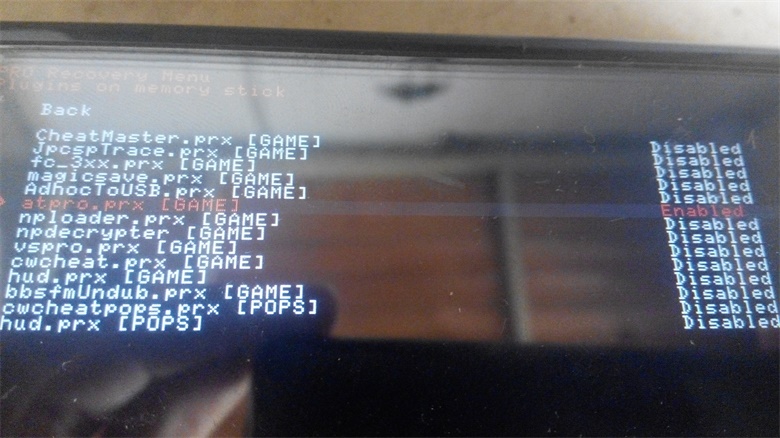
when atpro.prx is enable, make sure the wifi wihch in hotspot.txt is available and the ip in server.txt is correct and PPSSPP is running game otherwise PSP will black when try play multiplay.
when atpro.prx is enable, Hold START to exit game
pro online client only support psp2000 or psp3000 with 6.20-pro-c, 63X-pro-c or 6.60-pro-c
Posts: 6
Threads: 0
Joined: Mar 2016
Reputation:
0
When I was at the plugins menu, nothing appeared, so I tried so enable some other things, to see if the plugins appeared, still nothing, and after that patapon couldnt launch, i tried to unninstall the pro firmware, I tried to install it again and see if the options was like in the start, I clicked at fast recovery and it appear the data was corrupted, after that i tried to other option, the one bellow it, and my PSP screen went black, after that, when i turn the PSP ON, after 5~10 seconds of black screen, the PSP turns OFF.
I tried remove the memory stick, the battery, the UMD ... and nothing changes ... can I do something or is RIP PSP 2008-2016?
Posts: 358
Threads: 13
Joined: Mar 2013
Reputation:
15
(03-13-2016, 01:13 PM)LucasxDsY Wrote: When I was at the plugins menu, nothing appeared, so I tried so enable some other things, to see if the plugins appeared, still nothing, and after that patapon couldnt launch, i tried to unninstall the pro firmware, I tried to install it again and see if the options was like in the start, I clicked at fast recovery and it appear the data was corrupted, after that i tried to other option, the one bellow it, and my PSP screen went black, after that, when i turn the PSP ON, after 5~10 seconds of black screen, the PSP turns OFF.
I tried remove the memory stick, the battery, the UMD ... and nothing changes ... can I do something or is RIP PSP 2008-2016?
You nee add "ms0:/seplugins/atpro.prx 1" to ms0:\seplugins\gmae.txt
If you didn't found game.txt on your PSP memstick card, just create yourself
Posts: 6
Threads: 0
Joined: Mar 2016
Reputation:
0
I created it, and i wrote "ms0:/seplugins/atpro.prx 1" in it, but now my psp screen is allways black and i cant connect my psp to my computer with it in this condition ... its RIP? or I can do something to stop having this black screen?
Posts: 1
Threads: 0
Joined: May 2016
Reputation:
0
Are ppsspp allow to use multiplayer portal/battle gate at patapon 3?
Posts: 5,371
Threads: 14
Joined: Mar 2013
Reputation:
303
Merged.
♦ Intel Core i7-6700HQ | 16 GB RAM | NVIDIA GeForce GTX 960M | Debian Testing
♦ Intel Core i7-2630QM | 4 GB RAM | NVIDIA GeForce GT 540M | Debian Testing
♦ PSP-3004 | 6.60 PRO-C2
|





