Posts: 3,228
Threads: 25
Joined: Nov 2012
Reputation:
98
I recommend updating to the latest git build, it may improve various graphical effects and I think it'll be better performance than what I assume you're using (v0.9.8 probably?)
Also, I recommend turning off "retain changed textures" for this game. Two other options worth trying are "fast memory" and "multithreading". Both may improve performance, but could cause crashes (I've not experienced any that I recall in my limited testing of this game, though.)
On your tablet, you may consider disabling "buffered rendering", which could improve performance but will cause a lot of effects not to work.
As far as the post-cutscene, there's an issue on GitHub:
https://github.com/hrydgard/ppsspp/issues/6008
Unfortunately, this is an area that can break a bunch of games in different ways, so it probably won't be fixed before the v0.9.9 release which should be coming soon.
By the way, if anyone here can check on the graphical effects in the latest git build with "simulate block transfers" enabled, I'd love to know if there are any left that are not working. See this GitHub issue:
https://github.com/hrydgard/ppsspp/issues/5807
-[Unknown]
Posts: 43
Threads: 3
Joined: Dec 2012
Reputation:
0
(06-19-2014, 01:45 AM)[Unknown] Wrote: I recommend updating to the latest git build, it may improve various graphical effects and I think it'll be better performance than what I assume you're using (v0.9.8 probably?)
Also, I recommend turning off "retain changed textures" for this game. Two other options worth trying are "fast memory" and "multithreading". Both may improve performance, but could cause crashes (I've not experienced any that I recall in my limited testing of this game, though.)
On your tablet, you may consider disabling "buffered rendering", which could improve performance but will cause a lot of effects not to work.
As far as the post-cutscene, there's an issue on GitHub:
https://github.com/hrydgard/ppsspp/issues/6008
Unfortunately, this is an area that can break a bunch of games in different ways, so it probably won't be fixed before the v0.9.9 release which should be coming soon.
By the way, if anyone here can check on the graphical effects in the latest git build with "simulate block transfers" enabled, I'd love to know if there are any left that are not working. See this GitHub issue:
https://github.com/hrydgard/ppsspp/issues/5807
-[Unknown]
OffTopic:
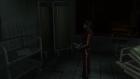
@[Unknown] the simulate block transfers fixed almost all graphical effects in Silent Hill Origins, the only issue left is that the Flashlight doesn't produce lighting in scenario, however on characters and some objects it works ok.
FlashlightOFF (No issue here)
FlashlightON (Flashlight should do lightning in scenario too)
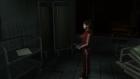
simulate block transfers is ON in both shots (with it OFF the game gets many bugs in graphics)
Sorry for my english.
CPU: Intel Core i7 3770 3.4 GHz (3.9 GHz with turbo boost) 4.23GHz with OC
RAM 8GB DDR3
NVIDIA GTX 770 Gigabyte
Windows 7 Ultimate 64bit
Currently using Driver 337.88 WHQL
Posts: 3,228
Threads: 25
Joined: Nov 2012
Reputation:
98
This is about Valkyrie Profile, not Silent Hill.
-[Unknown]
Posts: 9
Threads: 1
Joined: Nov 2013
Reputation:
0
can i ask what's the best settings for this game? thanks..
Posts: 18
Threads: 0
Joined: Dec 2013
Reputation:
0
(06-21-2014, 06:55 PM)Bad Company Wrote: (06-19-2014, 01:45 AM)[Unknown] Wrote: I recommend updating to the latest git build, it may improve various graphical effects and I think it'll be better performance than what I assume you're using (v0.9.8 probably?)
Also, I recommend turning off "retain changed textures" for this game. Two other options worth trying are "fast memory" and "multithreading". Both may improve performance, but could cause crashes (I've not experienced any that I recall in my limited testing of this game, though.)
On your tablet, you may consider disabling "buffered rendering", which could improve performance but will cause a lot of effects not to work.
As far as the post-cutscene, there's an issue on GitHub:
https://github.com/hrydgard/ppsspp/issues/6008
Unfortunately, this is an area that can break a bunch of games in different ways, so it probably won't be fixed before the v0.9.9 release which should be coming soon.
By the way, if anyone here can check on the graphical effects in the latest git build with "simulate block transfers" enabled, I'd love to know if there are any left that are not working. See this GitHub issue:
https://github.com/hrydgard/ppsspp/issues/5807
-[Unknown]
OffTopic:
@[Unknown] the simulate block transfers fixed almost all graphical effects in Silent Hill Origins, the only issue left is that the Flashlight doesn't produce lighting in scenario, however on characters and some objects it works ok.
FlashlightOFF (No issue here)
FlashlightON (Flashlight should do lightning in scenario too)
simulate block transfers is ON in both shots (with it OFF the game gets many bugs in graphics)
Sorry for my english.
Is this on pc or andriod ?
Posts: 43
Threads: 3
Joined: Dec 2012
Reputation:
0
(07-01-2014, 09:47 AM)Jesse Wrote: (06-21-2014, 06:55 PM)Bad Company Wrote: (06-19-2014, 01:45 AM)[Unknown] Wrote: I recommend updating to the latest git build, it may improve various graphical effects and I think it'll be better performance than what I assume you're using (v0.9.8 probably?)
Also, I recommend turning off "retain changed textures" for this game. Two other options worth trying are "fast memory" and "multithreading". Both may improve performance, but could cause crashes (I've not experienced any that I recall in my limited testing of this game, though.)
On your tablet, you may consider disabling "buffered rendering", which could improve performance but will cause a lot of effects not to work.
As far as the post-cutscene, there's an issue on GitHub:
https://github.com/hrydgard/ppsspp/issues/6008
Unfortunately, this is an area that can break a bunch of games in different ways, so it probably won't be fixed before the v0.9.9 release which should be coming soon.
By the way, if anyone here can check on the graphical effects in the latest git build with "simulate block transfers" enabled, I'd love to know if there are any left that are not working. See this GitHub issue:
https://github.com/hrydgard/ppsspp/issues/5807
-[Unknown]
OffTopic:
@[Unknown] the simulate block transfers fixed almost all graphical effects in Silent Hill Origins, the only issue left is that the Flashlight doesn't produce lighting in scenario, however on characters and some objects it works ok.
FlashlightOFF (No issue here)
FlashlightON (Flashlight should do lightning in scenario too)
simulate block transfers is ON in both shots (with it OFF the game gets many bugs in graphics)
Sorry for my english.
Is this on pc or andriod ?
...PC.
CPU: Intel Core i7 3770 3.4 GHz (3.9 GHz with turbo boost) 4.23GHz with OC
RAM 8GB DDR3
NVIDIA GTX 770 Gigabyte
Windows 7 Ultimate 64bit
Currently using Driver 337.88 WHQL
Posts: 30
Threads: 0
Joined: Jun 2014
Reputation:
0
The cutscenes/FMVs are slow as hell on Android. Anyway to fix this? I use the latest build and almost default setting except frameskip +2. Another issue is when you press back button while watching the cutscene, it will completely ruin.
Posts: 16
Threads: 0
Joined: Oct 2013
Reputation:
0
11-21-2014, 10:54 PM
(This post was last modified: 11-21-2014, 10:58 PM by jobestroud.)
I am running this on 9.9.1 g6a49337.
Is this game still a hog or do I have some setting that just jacks it all up.
Just like with Wild arms AF I will be diving into this to see if I can do anything to get it to work correctly.
SO far. The squares in the pictures on the left side of the screen. To remedy this I turned post processing filter to off and render resolution to 2x. That fixes that.
Since it is a 2d game render resolution tends to cause more harm then good. Now to get full speed for me which is odd to say the least. Still haven't got that down yet. Multithreaded and other speed hacks seem to do very little to me. Putting frame skip to 2 seems to really have helped. Still bounce from 14 fps to 60 fps... All over.
I will screw with more and see what I can do. Specs should be in sig.
EDIT: For more info on squares. Leave texture scaling to Auto and xBRZ. Screwing with it while game is running just breaks things worse. Fixes squares for the most part. Like one sentence they will have it and when the picture refreshes after a text box it is fixed.
MOBO - ASUS 990FX Sabertooth R2.0
CPU - AMD FX 8350 4.0 GHZ (Oc 4.9)
RAM - 16 Gigs DDR3 1866mhz
HDD - 5 1TB 7200 RPM
GPU - Nvidia GTX 760
Posts: 4
Threads: 1
Joined: Dec 2014
Reputation:
0
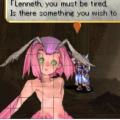
Characters on the left side have this square bug when they speak, everything is normal o the right side. Does eny1 know how to fix? I'm using the latest version of ppsspp on this site:
buildbot.orphis.net/ppsspp/
Posts: 5,371
Threads: 14
Joined: Mar 2013
Reputation:
303
Merged.
♦ Intel Core i7-6700HQ | 16 GB RAM | NVIDIA GeForce GTX 960M | Debian Testing
♦ Intel Core i7-2630QM | 4 GB RAM | NVIDIA GeForce GT 540M | Debian Testing
♦ PSP-3004 | 6.60 PRO-C2
Posts: 4
Threads: 1
Joined: Dec 2014
Reputation:
0
(12-14-2014, 11:51 PM)vnctdj Wrote: Merged.
What?
Posts: 3,228
Threads: 25
Joined: Nov 2012
Reputation:
98
Shouldn't happen at 1x.
-[Unknown]
Posts: 4
Threads: 1
Joined: Dec 2014
Reputation:
0
(12-15-2014, 12:06 AM)[Unknown] Wrote: Shouldn't happen at 1x.
-[Unknown]
Yeah it works but the image quality become unbearable lol
Posts: 3,228
Threads: 25
Joined: Nov 2012
Reputation:
98
"Unbearable" = "same as the PSP". Well, unfortunately, this game wasn't designed with higher resolutions in mind.
-[Unknown]
Posts: 5,371
Threads: 14
Joined: Mar 2013
Reputation:
303
(12-14-2014, 11:58 PM)tran01hai Wrote: (12-14-2014, 11:51 PM)vnctdj Wrote: Merged.
What?
It means that I have put your thread in this one because we keep only one thread per game.
♦ Intel Core i7-6700HQ | 16 GB RAM | NVIDIA GeForce GTX 960M | Debian Testing
♦ Intel Core i7-2630QM | 4 GB RAM | NVIDIA GeForce GT 540M | Debian Testing
♦ PSP-3004 | 6.60 PRO-C2
|





