





Edit: A new way to play play multiplayer on one PC (support 4 PPSSPP)
http://forums.ppsspp.org/showthread.php?tid=16972
you need adhoclocal
adhoclocal is written by Bigpet https://github.com/hrydgard/ppsspp/pull/7276
downloads:
ppsspp-v1.1.1-62-adhoclocal-chatSimple.7z: http://www.545c.com/file/125865817
PPSSPP-v1.1.1-62-chatSimple.7z: http://www.545c.com/file/125865820
PPSSPP-v1.0.1-2668-adhoclocal-chatSimple.zip: http://www.545c.com/file/118257344
Bigpet: this is obviously just a hack for now to be able to test networking without needing two PCs or a VM, especially because of the inelegantly hackish global localIP value.
onelight:
1. I add simple chat support
2. after PPSSPP-v1.0.1-832-adhoclocal-chatSimple, I try do some improve, it may help play adhoclocal or play online.
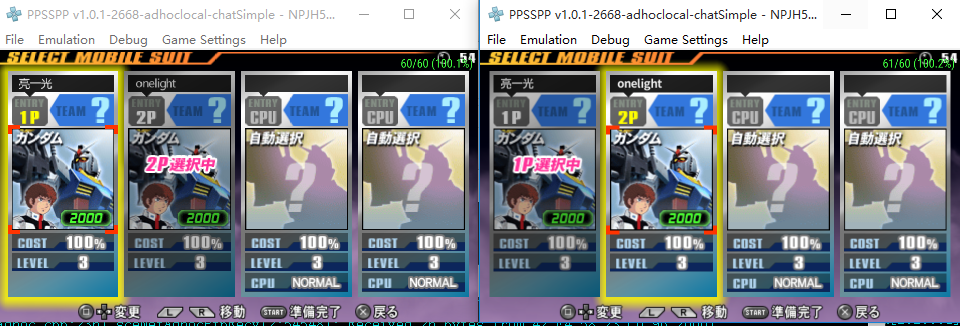
3. after PPSSPP-v1.0.1-2668-adhoclocal-chatSimple, fixed Gundam VS Gundam Next Plus, you can using it to play on one PC or play online.
Warning: adhoclocal doesn't working on windows XP
First, you should run 2 PPSSPP-adhoclocal from different folder.
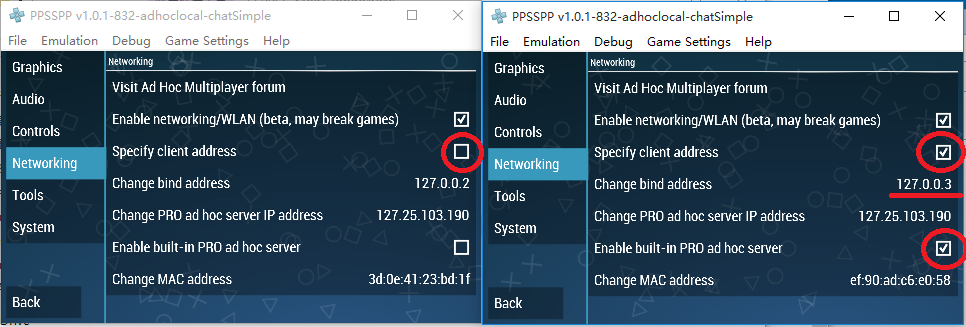
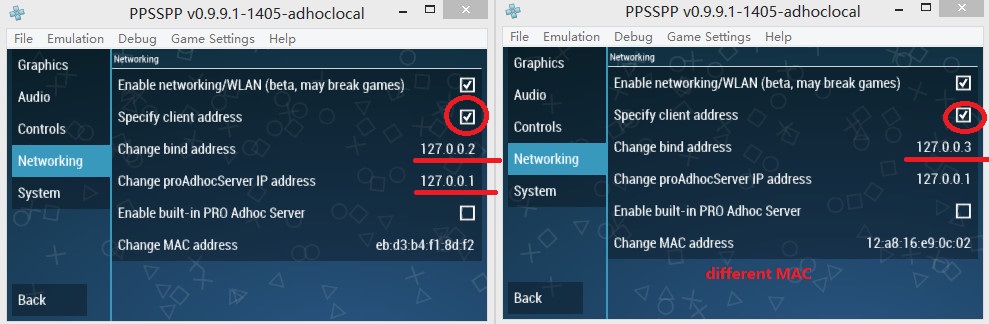
for settings:
Note:
1. different PPSSPP-adhoclocal should have different bing address (127.0.0.2, 127.0.0.3, 127.0.0.4 etc)
2. all PPSSPPs using local pro AdhocServer IP (127.XXX.XXX.XXX)
you can also try using an original PPSSPP with one PPSSPP-adhoclocal
Then, just run you game and try to play.
Video tutorial
Video tutorial for older builds
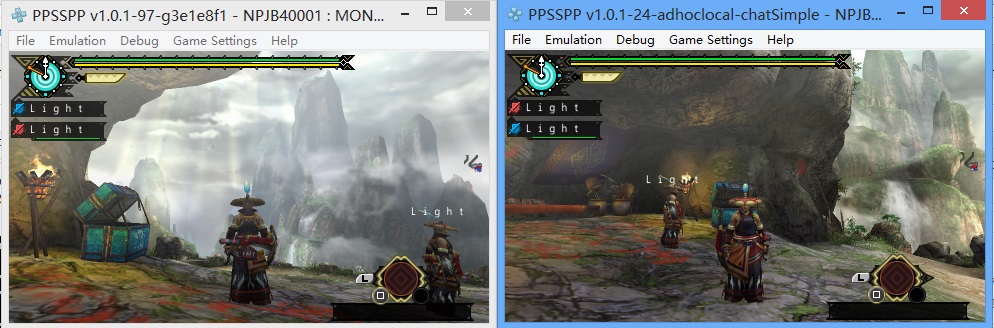
1. uisng PPSSPP-adhoclocal and PPSSPP normal. It work whe the player who uisng PPSSPP-adhoclocal hosted hunting mission.
https://www.youtube.com/watch?v=_B_WgPjgDng
2.Tutorial How to play multiplayer Tekken 6 PPSSPP on One PC
https://www.youtube.com/watch?v=kjYhfweYg9E
About controls two PPSSPP:
If you have only one gamepad try this settings
the focused ppsspp only using keyboard, other ppsspp only using gamepad
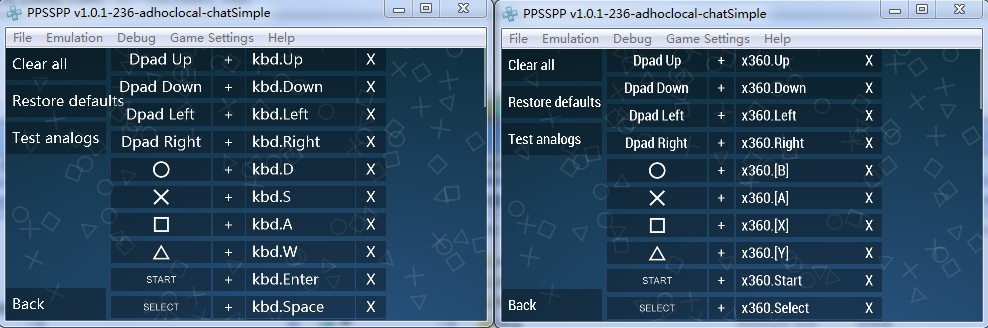
If you want using 2 gamepads setting like this:
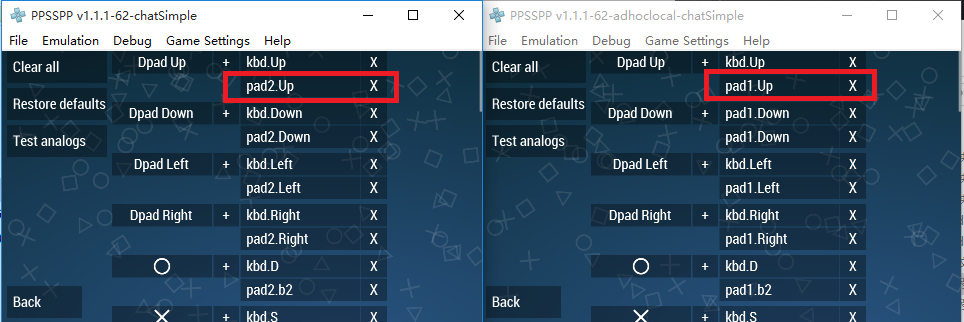
note:
1. no all game adhoc will work even it working on 2 PCs
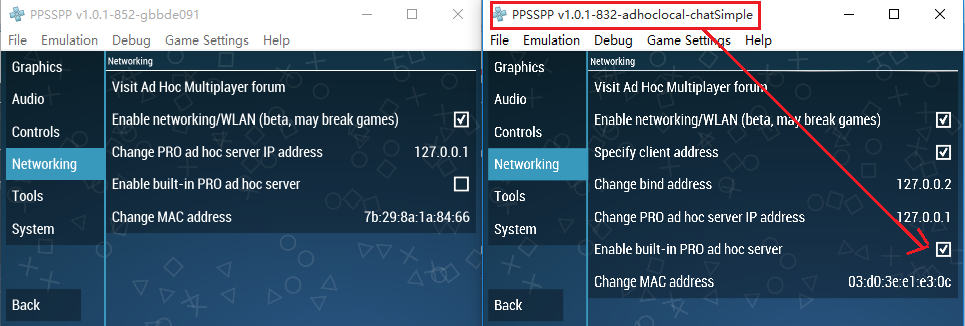
2. you should enable built-in PRO Adhoc Server for one of PPSSPP-v1.0.1-832-adhoclocal-chatSimple or using adhocserver.exe if you using older adhoclocal builds.
3.If ppsspp-adhoclocal with ppsspp-adhoclocal not work, try ppsspp-adhoclocal with ppsspp (noadhoclocal) or ppsspp-adhoclocal with JPCSP.
5.If you get "Socket error (10048) when connecting to 127.0.0.1/127.0.0.1:27312", try change pro AdhocServer IP address to another local IP (et. 127.0.0.5)
settings for play adhoclocal on one PC (for older builds)
I am using adhocserver.exe, disable built-in PRO Adhoc Server for all PPSSPP
download AdhocServer.exe http://www.sn9.us/file/92865164
OR
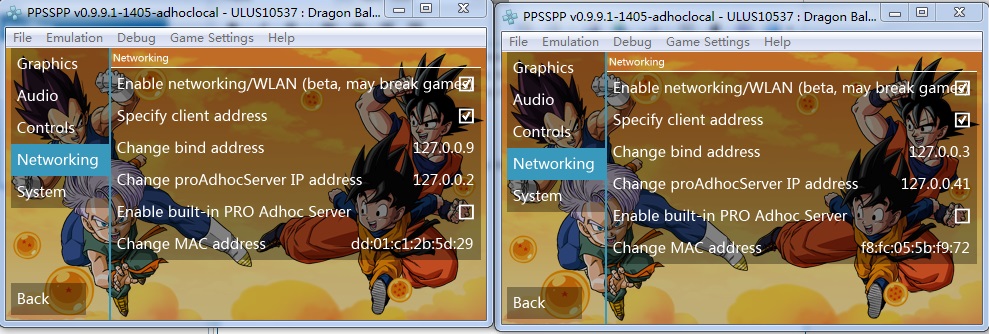
connect 4 (or more) PPSSPP on one PC also work
PPSSPP X4 (cant start hunting, ppsspp-adhoclocal with ppsspp-noadhoclocal can start hunting )
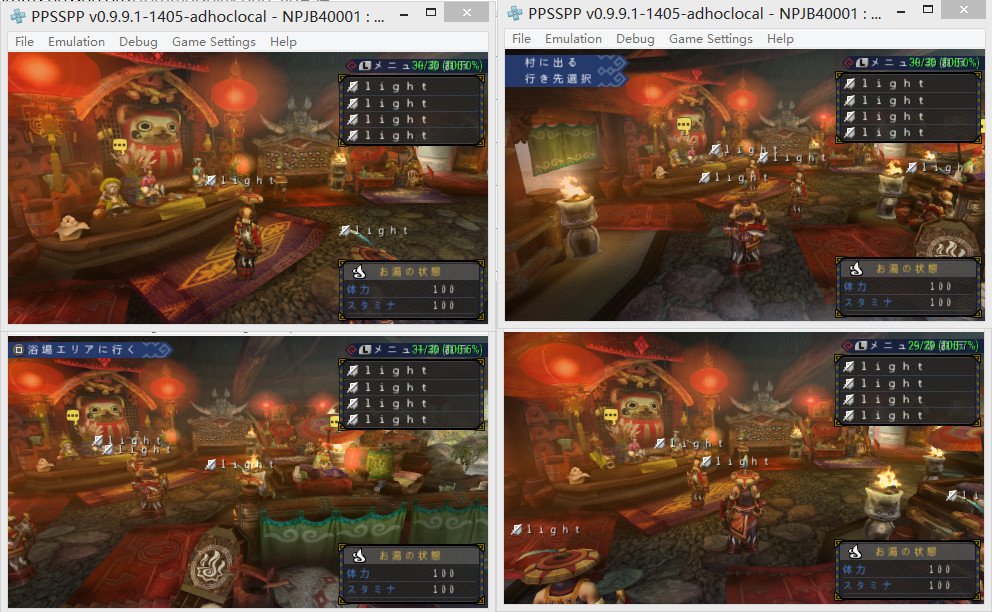
the 3rd PPSSPP using bing address 127.0.0.4 the 4th PPSSPP using 127.0.0.5
older builds
PPSSPP-v1.0.1-832-adhoclocal-chatSimple here download ppsspp-adhoclocal(win32 bit and win64 bit)
or download from mediafire http://www.mediafire.com/download/iz39mu...tSimple.7z
http://www.mediafire.com/download/3qcb0z...Simple.zip
ppsspp-v1.0.1-236-adhoclocal-chatSimple
ppsspp-v1.0.1-24-adhoclocal-chatSimple
ppsspp-v1.0-41-adhoclocal
PPSSPP-v0.9.9.1-1405-adhoclocal
http://forums.ppsspp.org/showthread.php?tid=16972
you need adhoclocal
adhoclocal is written by Bigpet https://github.com/hrydgard/ppsspp/pull/7276
downloads:
ppsspp-v1.1.1-62-adhoclocal-chatSimple.7z: http://www.545c.com/file/125865817
PPSSPP-v1.1.1-62-chatSimple.7z: http://www.545c.com/file/125865820
PPSSPP-v1.0.1-2668-adhoclocal-chatSimple.zip: http://www.545c.com/file/118257344
Bigpet: this is obviously just a hack for now to be able to test networking without needing two PCs or a VM, especially because of the inelegantly hackish global localIP value.
onelight:
1. I add simple chat support
2. after PPSSPP-v1.0.1-832-adhoclocal-chatSimple, I try do some improve, it may help play adhoclocal or play online.
3. after PPSSPP-v1.0.1-2668-adhoclocal-chatSimple, fixed Gundam VS Gundam Next Plus, you can using it to play on one PC or play online.
Warning: adhoclocal doesn't working on windows XP
First, you should run 2 PPSSPP-adhoclocal from different folder.
for settings:
Note:
1. different PPSSPP-adhoclocal should have different bing address (127.0.0.2, 127.0.0.3, 127.0.0.4 etc)
2. all PPSSPPs using local pro AdhocServer IP (127.XXX.XXX.XXX)
you can also try using an original PPSSPP with one PPSSPP-adhoclocal
Then, just run you game and try to play.
Video tutorial
Video tutorial for older builds
1. uisng PPSSPP-adhoclocal and PPSSPP normal. It work whe the player who uisng PPSSPP-adhoclocal hosted hunting mission.
https://www.youtube.com/watch?v=_B_WgPjgDng
2.Tutorial How to play multiplayer Tekken 6 PPSSPP on One PC
https://www.youtube.com/watch?v=kjYhfweYg9E
About controls two PPSSPP:
If you have only one gamepad try this settings
the focused ppsspp only using keyboard, other ppsspp only using gamepad
If you want using 2 gamepads setting like this:
note:
1. no all game adhoc will work even it working on 2 PCs
2. you should enable built-in PRO Adhoc Server for one of PPSSPP-v1.0.1-832-adhoclocal-chatSimple or using adhocserver.exe if you using older adhoclocal builds.
3.If ppsspp-adhoclocal with ppsspp-adhoclocal not work, try ppsspp-adhoclocal with ppsspp (noadhoclocal) or ppsspp-adhoclocal with JPCSP.
5.If you get "Socket error (10048) when connecting to 127.0.0.1/127.0.0.1:27312", try change pro AdhocServer IP address to another local IP (et. 127.0.0.5)
settings for play adhoclocal on one PC (for older builds)
I am using adhocserver.exe, disable built-in PRO Adhoc Server for all PPSSPP
download AdhocServer.exe http://www.sn9.us/file/92865164
OR
connect 4 (or more) PPSSPP on one PC also work
PPSSPP X4 (cant start hunting, ppsspp-adhoclocal with ppsspp-noadhoclocal can start hunting )
the 3rd PPSSPP using bing address 127.0.0.4 the 4th PPSSPP using 127.0.0.5
older builds
PPSSPP-v1.0.1-832-adhoclocal-chatSimple here download ppsspp-adhoclocal(win32 bit and win64 bit)
or download from mediafire http://www.mediafire.com/download/iz39mu...tSimple.7z
http://www.mediafire.com/download/3qcb0z...Simple.zip
ppsspp-v1.0.1-236-adhoclocal-chatSimple
ppsspp-v1.0.1-24-adhoclocal-chatSimple
ppsspp-v1.0-41-adhoclocal
PPSSPP-v0.9.9.1-1405-adhoclocal