Thread Rating:
  • 3 Vote(s) - 5 Average
  • 1
  • 2
  • 3
  • 4
  • 5
Dreamcast Emulator "Reicast" [Android/Multi-Platform]
(02-23-2014, 11:23 PM)angelXwind Wrote: reicast builds for iOS (soon) and Android:

http://reicast.angelxwind.net/?page/downloads

PPSSPP builds for iOS, Android, OS X, and Linux:

http://ppsspp.angelxwind.net/?page/downloads

Complete KarenBuildBot list:

http://karenbuildbot.angelxwind.net/

They are built after every commit (technically every 10 minutes, but close enough).

angelXwind thanks for the port of reicast iOS and gl in the Compilation that is giving problems
Reply
(02-24-2014, 01:15 AM)Faviopkrk Wrote:
(02-23-2014, 11:23 PM)angelXwind Wrote: reicast builds for iOS (soon) and Android:

http://reicast.angelxwind.net/?page/downloads

PPSSPP builds for iOS, Android, OS X, and Linux:

http://ppsspp.angelxwind.net/?page/downloads

Complete KarenBuildBot list:

http://karenbuildbot.angelxwind.net/

They are built after every commit (technically every 10 minutes, but close enough).

angelXwind thanks for the port of reicast iOS and gl in the Compilation that is giving problems
is it available for download?
Reply
r6 released!!
S TO DA G
Reply
(01-03-2014, 05:03 PM)MaXiMu Wrote: Do You system is Windows XP? Sorry I compile with visual studios 2013 (Default) and no change for Windows XP compatibility

Try with the new I add compile with v120_xp maybe help you?.

http://www.sendspace.com/file/uadxw2
How so put the keys? I do not see the config control
Soft very good on Win 7 32 bit x86
Reply
Oh yeaaa! finally active development for iOS Smile All the best.. Karen on compiling for iPhone/iPad. Me needz my fix of MK: GOLD
Reply
Yo people!! I’m intending to play Resident Evil 3 on this emulator, because it looks prettier than PSX version!

I just want to know if there is some possibility to insert cheat codes on it, once the game is really hard and I’ll be playing on touchscreen!
Can someone help me!?

Ps.: I have already googled it and found nothing!! =/
I was an Xperia Play gamer until my dog ate my beloved phone!

Now I’m an Xperia ZL/ZQ gamer!
Quad-Core 1.5 GHZ
2GB RAM

It works better, but i miss the gamepad!! T_T'
Reply
no...still no reicast for us ios users....
Reply
(05-02-2014, 02:56 PM)POGO4LIFE Wrote: no...still no reicast for us ios users....

try to talk to her https://twitter.com/angelXwind
Reply
(05-02-2014, 11:15 AM)heiwasan Wrote: Yo people!! I’m intending to play Resident Evil 3 on this emulator, because it looks prettier than PSX version!

I just want to know if there is some possibility to insert cheat codes on it, once the game is really hard and I’ll be playing on touchscreen!
Can someone help me!?

Ps.: I have already googled it and found nothing!! =/

Cheats are not implemented on the emulator yet.
Reply
Question - I just got a new android phone, (my first one, I love it) the Galaxy S5. When I attempt to boot the BIOS it changes the screen horizontal for a second then kicks me out. I tried the build in the Play Store and the newest apk file from the Reicast site.

Would anyone be able to help me out?
Reply
You need the dreamcast bios files, otherwise it will not work. They need to go into a folder called dc in the sdcard root.
it should look like this sdcard://dc/data/dc_boot.bin and so on.
Dont ask for a copy of the bios as its illegal. But i guess its easy to google "reicast bios files" right?
[Gaming PC]: i7 3770k @ 4,6ghz - 8gb DDR3 1600 G.Skill Ares - GTX 780Ti AMP! - Windows 8 pro x64 - Asus VG248QE
[Mobile]: Iphone 5s 16gb Space Grey - Galaxy S3 GT-i9305 LTE
[Android]: Nvidia Shield
[Consoles]: PsVita - Crisis Core Limited Edition PSP - PS4
Reply
The strangest thing happens to my Reicast setup on Android, it wouldn't work on what you said to do, but this did......sdcard/dc/data/data/data/dc_boot.bin
Don't ask me why but it just did. ?????
Reply
we still have no ios version ...
Reply
Can you post a guide on how to set up the files? I'm using samsung s4 and it's pretty hard since I can't find the files.
Reply
Information 
(08-19-2014, 07:54 PM)irock2much Wrote: Can you post a guide on how to set up the files? I'm using samsung s4 and it's pretty hard since I can't find the files.
Hi there, try this.........

Please note I used the file manager that came with my tablet to create the folders & renamed them as well.

Place a folder called dc (/mnt/sdcard/dc) <- as shown here.
Inside that folder place a new folder called data (/mnt/sdcard/dc/data) <- as shown here.
Inside that folder place dc_bios.bin + dc_boot.bin + dc_flash.bin + buttons.png (Please note: dc_bios.bin & dc_boot.bin are the same file, but named different, wasn't sure which one was recognised by the emulator, so used both).
You can place your games in any folder, i have mine here: (/mnt/extsd/Game Roms/DC Games.
Once the emulator is run the first time, it will create a file called - emu.cfg that should be next to the data folder, where the vmu_save_A1.bin & vmu_save_A2.bin will be created, but you have to go first to VMU main screen in the emulator as shown here:
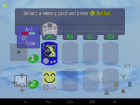
   
By clicking on Boot Dreamcast BIOS.
Once there, you have to setup your 2 x VMU's to whatever colours & characters, then it formats (creates the 2 files) the cards for you, once done, its ready for your games to save on.
In fact the latest versions of Reicast have Cloud VMU support using Dropbox (Truly awesome program, i highly recommend using Dropbox).

Sorry if this is confusing as I am not good at explaining things, but anyway I hope this helps. Cool
Reply


Forum Jump: