Posts: 3
Threads: 0
Joined: Nov 2013
Reputation:
0
11-03-2013, 02:23 AM
(This post was last modified: 11-03-2013, 02:24 AM by JFA_89.)
(11-02-2013, 08:01 PM)stodag Wrote: Np, glad I could help.
I ended up discovering the same, works perfect so, press TRIANGLE and START and the game loads(maybe skip a video with this process), up worked well in version 9.1(but with worse graphics and sound, and lag).
and that solves the mystery of why it worked the first time, impatience!!!
pressing all buttons LOL 
Thanks to all 
Posts: 19
Threads: 1
Joined: May 2013
Reputation:
0
This game has a little bit issue about the textures of all character's face, actually they look ugly when they face at front but when they are in side view they look nice
My PC Specs:
Motherboard: MSI K9N6PGM2-V2
Processor: AMD ATHLON II X2 255 3.1Ghz
RAM: 3GB 800mhz DDR2 Kingmax
Graphic Card: AFOX Radeon HD 6570 1GB DDR3
PSU: 500watts Generic Powersupply
Operating System: Windows 7 Ultimate 64bit
Posts: 1
Threads: 0
Joined: Dec 2013
Reputation:
0
12-14-2013, 01:08 PM
(This post was last modified: 12-14-2013, 01:09 PM by jackson1.)
Hi guys. As a big MK fan I was really excited to see PPSSPP emulating MKU almost perfectly. As it was mentioned before there is a problem in Konquest mode. After defeating Scorpion in the final battle the game crashes:
- in version 0.9.5 the game stops at "I have defeated him!..." - black screen.
- in version 0.9.6 the sound stops and the game freezes at the following screen:
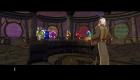
Hopefully soon there will be a fix so we can fully enjoy the game. Thanks.
Posts: 38
Threads: 5
Joined: Jul 2013
Reputation:
0
I cant get it to work on my ipad air. After i load the game it freezes.
Posts: 38
Threads: 5
Joined: Jul 2013
Reputation:
0
now i can watch the intro. but after that (or skipping intro) it freezes _(
Posts: 730
Threads: 9
Joined: Apr 2013
Reputation:
17
 01-12-2014, 03:27 AM
(01-12-2014, 01:08 AM)PresidentZer0 Wrote: now i can watch the intro. but after that (or skipping intro) it freezes _( There has always been a problem with the beginning of this game.
When you see your profile name on screen, press 'Start' as instructed, but as soon as you press that, start pressing 'X' quickly as many times until the main menu of the game shows.
In other words don't let the Intro start, but you must be quick.
Posts: 583
Threads: 12
Joined: Feb 2013
Reputation:
5
01-12-2014, 04:43 PM
(This post was last modified: 01-12-2014, 04:47 PM by brujo55.)
(01-12-2014, 01:08 AM)PresidentZer0 Wrote: now i can watch the intro. but after that (or skipping intro) it freezes _(
(01-12-2014, 03:27 AM)The Phoenix Wrote: (01-12-2014, 01:08 AM)PresidentZer0 Wrote: now i can watch the intro. but after that (or skipping intro) it freezes _( There has always been a problem with the beginning of this game.
When you see your profile name on screen, press 'Start' as instructed, but as soon as you press that, start pressing 'X' quickly as many times until the main menu of the game shows.
In other words don't let the Intro start, but you must be quick.
working on iphone 5S at 4x rendering,No frameskip,whit your method.thx
super smooth,loved my iphone 5S

Posts: 15
Threads: 2
Joined: Jan 2014
Reputation:
0
Anyone able to fix the shadow textures, it shows the shadow but a light shading block around it, not a game killer but would be nice to make it look pretty
Posts: 1,226
Threads: 9
Joined: Apr 2013
Reputation:
75
02-09-2014, 12:02 PM
(This post was last modified: 02-09-2014, 02:22 PM by solarmystic.)
As of v0.9.6-391-g26a700d the game will hang if you attempt to skip the first Midway video that appears after loading your profile.
A temporary workaround to this issue is to quickly hammer the "Start" button before the video even plays to quickly get to the main menu.
PPSSPP Modern Testbed:-
Intel Core i5 4690K @ 4.0 GHz
NVIDIA Geforce GTX 760 2GB GDDR5 VRAM @ 1138/6500 Mhz
16 GB DDR3 RAM @ 1600 MHz
Windows 7 x64 SP1
PPSSPP Ancient Testing Rig:-
Intel Core 2 Duo T9550 @ 2.8GHz
ATI Mobility Radeon 4670 1GB GDDR3 VRAM @ 843/882 MHz
8 GB DDR3 RAM @ 1066 MHz
Windows 7 x64 SP1
Posts: 2
Threads: 1
Joined: Mar 2014
Reputation:
0
When i Try To Play i Get Black Screen After Creating A Memory Card
Posts: 1,226
Threads: 9
Joined: Apr 2013
Reputation:
75
(03-06-2014, 10:47 AM)DucSector Wrote: When i Try To Play i Get Black Screen After Creating A Memory Card
Just spam the X button when the Black Screen shows up to get to the main menu, the videos that are supposed to show up after memory card creation aren't doing so at the moment.
PPSSPP Modern Testbed:-
Intel Core i5 4690K @ 4.0 GHz
NVIDIA Geforce GTX 760 2GB GDDR5 VRAM @ 1138/6500 Mhz
16 GB DDR3 RAM @ 1600 MHz
Windows 7 x64 SP1
PPSSPP Ancient Testing Rig:-
Intel Core 2 Duo T9550 @ 2.8GHz
ATI Mobility Radeon 4670 1GB GDDR3 VRAM @ 843/882 MHz
8 GB DDR3 RAM @ 1066 MHz
Windows 7 x64 SP1
Posts: 1
Threads: 0
Joined: Mar 2014
Reputation:
0
03-17-2014, 06:08 PM
(This post was last modified: 03-17-2014, 06:09 PM by Earthquake83.)
Hi guys. This is my first post here so I apologize if I put this question in the wrong section. The problem I'm having is with Mortal Kombat: Unchained as the game freezes right after I press start at the "these profiles are loaded screen". The only other game I've played so far is Smackdown Vs Raw 2009 and that game plays about 80%-85% perfectly. I'm using PPSSPP v0.9.6.2 on a Windows 7 PC. I've got 8 gigs of ram and a Duo CPU at 2.93GHz and 2.94GHz. Any ideas what could be wrong? If you guys need more information, please let me know. Thank you.
Posts: 1,226
Threads: 9
Joined: Apr 2013
Reputation:
75
03-17-2014, 08:40 PM
(This post was last modified: 03-17-2014, 08:44 PM by solarmystic.)
Hello and welcome to the forums Earthquake83.
1. Firstly, update to the latest buildbot build here:-
http://buildbot.orphis.net/ppsspp/
1a. If you don't have them already, you have to install these Visual Studio 2013 redistributables from MS, it's a requirement for PPSSPP from 0.9.7.2 onwards. If using 64bit Windows 7, install both x86 and x64 redistributables, and just x86 if using 32bit Windows 7:-
http://www.microsoft.com/en-us/download/...x?id=40784
2. Next, run PPSSPP, load the game and right afther "These Profiles are loaded screen", just mash the X button.
3. You should be able to skip the black screens (videos not being played back properly), and head straight to the main menu.
Next time around, please post this game specific issue in its own thread:-
http://forums.ppsspp.org/showthread.php?...tal+kombat
PPSSPP Modern Testbed:-
Intel Core i5 4690K @ 4.0 GHz
NVIDIA Geforce GTX 760 2GB GDDR5 VRAM @ 1138/6500 Mhz
16 GB DDR3 RAM @ 1600 MHz
Windows 7 x64 SP1
PPSSPP Ancient Testing Rig:-
Intel Core 2 Duo T9550 @ 2.8GHz
ATI Mobility Radeon 4670 1GB GDDR3 VRAM @ 843/882 MHz
8 GB DDR3 RAM @ 1066 MHz
Windows 7 x64 SP1
Posts: 2,392
Threads: 27
Joined: Mar 2013
Reputation:
91
Merged.
4GHz AMD 3900X, 32GB DDR4 RAM, 6GB Nvidia RTX 2060, Asus Crosshair 7 Hero (Wifi), Linux
How to ask useful questions: https://web.archive.org/web/20110214010944/http://support.microsoft.com/kb/555375
I'm not Dark_Alex, nor do I claim to be. Our nicknames are merely coincidence.
Posts: 1
Threads: 0
Joined: May 2014
Reputation:
0
The game freezes after beating Scorpion in the final mission to finish Konquest. Any help to fix this?
|





