Posts: 8
Threads: 0
Joined: Aug 2013
Reputation:
0
I happen to have a slight problem. I'm running 9.1 and with non buffered I have the lines which I can deal with, but the character models and random textures will disappear and reappear. with buffered rending on though, the screen flashes like crazy and I'm not sure what's causing it. :T
Posts: 583
Threads: 12
Joined: Feb 2013
Reputation:
5
(08-31-2013, 02:58 AM)Jeuri Wrote: I happen to have a slight problem. I'm running 9.1 and with non buffered I have the lines which I can deal with, but the character models and random textures will disappear and reappear. with buffered rending on though, the screen flashes like crazy and I'm not sure what's causing it. :T
use frame buffer to gpu.
Posts: 8
Threads: 0
Joined: Aug 2013
Reputation:
0
Even when I do that I still get all the flashy nonsense :/
Posts: 2,392
Threads: 27
Joined: Mar 2013
Reputation:
91
08-31-2013, 02:48 PM
(This post was last modified: 08-31-2013, 02:50 PM by TheDax.)
Turn off Vertex Cache. It makes this game flicker like crazy.
Edit: Or it always used to, at any rate. It seems like in 0.9.1-369 or so it doesn't flicker with it on my NVidia in the intro level..hm..
4GHz AMD 3900X, 32GB DDR4 RAM, 6GB Nvidia RTX 2060, Asus Crosshair 7 Hero (Wifi), Linux
How to ask useful questions: https://web.archive.org/web/20110214010944/http://support.microsoft.com/kb/555375
I'm not Dark_Alex, nor do I claim to be. Our nicknames are merely coincidence.
Posts: 8
Threads: 0
Joined: Aug 2013
Reputation:
0
08-31-2013, 02:55 PM
(This post was last modified: 08-31-2013, 02:56 PM by Jeuri.)
still doing it :c Current settings are:
Read frame buffer to GPU
frameskipping auto
hardware transform
upscale 2x, hybrid, deposterize checked
Anisotropic filter 8x, linear
Fast Memory
Dynarec
Multi-Threaded
CPU clock set to 68
edit: running on a Droid RAZR M with stock firmware if that helps any
Posts: 2,392
Threads: 27
Joined: Mar 2013
Reputation:
91
08-31-2013, 03:01 PM
(This post was last modified: 08-31-2013, 03:03 PM by TheDax.)
I know it'll slow the game down, but does it help if you put the CPU clock back to 0(which turns off the lock) or 222? Low emulated CPU speeds can cause weird glitches sometimes. Also perhaps try it without frameskipping.
Edit: Yeah, seems like it's caused by a really low CPU speed. If I turn it down into the 30mhz range it begins flickering for me..maybe try something higher like 80 or 111?
4GHz AMD 3900X, 32GB DDR4 RAM, 6GB Nvidia RTX 2060, Asus Crosshair 7 Hero (Wifi), Linux
How to ask useful questions: https://web.archive.org/web/20110214010944/http://support.microsoft.com/kb/555375
I'm not Dark_Alex, nor do I claim to be. Our nicknames are merely coincidence.
Posts: 8
Threads: 0
Joined: Aug 2013
Reputation:
0
Tried all of those, no dice. it wouldn't be so bad with the flicker if random buildings and stuff didn't flicker too. :T other than that, the game runs perfect haha
Posts: 2,392
Threads: 27
Joined: Mar 2013
Reputation:
91
Not really sure what else to try then at the moment..I'm thinking it's an Android issue. Sorry for wasting your time. 
4GHz AMD 3900X, 32GB DDR4 RAM, 6GB Nvidia RTX 2060, Asus Crosshair 7 Hero (Wifi), Linux
How to ask useful questions: https://web.archive.org/web/20110214010944/http://support.microsoft.com/kb/555375
I'm not Dark_Alex, nor do I claim to be. Our nicknames are merely coincidence.
Posts: 8
Threads: 0
Joined: Aug 2013
Reputation:
0
Nonsense! I appreciate the help  Do you think anti aliasing or mipmapping would help?
Posts: 2,392
Threads: 27
Joined: Mar 2013
Reputation:
91
I doubt it, but you could try them and see. Mipmapping would be a more likely culprit than AA.
4GHz AMD 3900X, 32GB DDR4 RAM, 6GB Nvidia RTX 2060, Asus Crosshair 7 Hero (Wifi), Linux
How to ask useful questions: https://web.archive.org/web/20110214010944/http://support.microsoft.com/kb/555375
I'm not Dark_Alex, nor do I claim to be. Our nicknames are merely coincidence.
Posts: 8
Threads: 0
Joined: Aug 2013
Reputation:
0
so been mucking around and I think I found a fix for the screen flicker! CPU is set to 111, frame skipping off, and basically all the same settings as above, just multi threaded off and I/O on thread on.
There is a small performance tradeoff, but I haven't seen any buildings blink out of existence yet so that's a plus!
Posts: 78
Threads: 2
Joined: Oct 2013
Reputation:
0
10-08-2013, 04:23 PM
(This post was last modified: 10-09-2013, 07:07 AM by Ankit Kumar.)
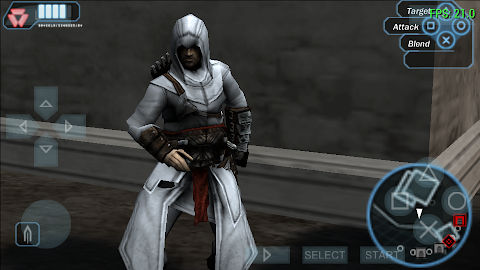
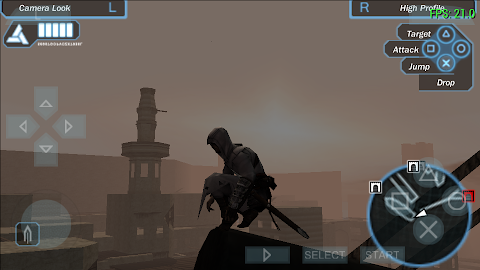
I don't know how to get better performance but Assassins Creed Bloodlines is mostly playable In 20 to 40 FPS
Settings were: Non buffered renderng, FXAA on, frameskipping off, hardware transform on, force max frame to 60 enable, xBRZ type upscaling, linear texture filtering, fast memory, I/o on thread enable, CPU clock o 115, Anisotropic 8x...
Note:- with buffered rendering colors are brighter but game is laggy and pixelated but in nonbuffered rendering game is too dark but better texture and FPS. With buffered rendering GPU or CPU game is complitly Unplayable
See the Screens

 Compatibility: Playable
Region: IND
Format: .ISO
Device: XOLO Q800
OS: Android 4.2
PPSSPP: v0.9.1-1627-g0a47509
If anyone knows to make this game more playable then please tell me......
and sorry if the thread is already exist.. I couldn't find it.
Posts: 46
Threads: 0
Joined: Mar 2013
Reputation:
0
Posts: 78
Threads: 2
Joined: Oct 2013
Reputation:
0
bro this thread is for ACB playable in Android not Windows and with latest build of ppsspp so this is legal...
you gave me the wrong link....
Posts: 2,392
Threads: 27
Joined: Mar 2013
Reputation:
91
10-08-2013, 04:39 PM
(This post was last modified: 10-08-2013, 04:39 PM by TheDax.)
We tend to have one thread per game(different game regions are exceptions), regardless of platform on this forum.
4GHz AMD 3900X, 32GB DDR4 RAM, 6GB Nvidia RTX 2060, Asus Crosshair 7 Hero (Wifi), Linux
How to ask useful questions: https://web.archive.org/web/20110214010944/http://support.microsoft.com/kb/555375
I'm not Dark_Alex, nor do I claim to be. Our nicknames are merely coincidence.
|




