
Thread Rating:
  • 0 Vote(s) - 0 Average
  • 1
  • 2
  • 3
  • 4
  • 5
Multiple Screens on Midnight Club DUB Edition
#1
I have a bug in Midnight Club 3 DUB Edition, the bug is recent, not had this before. It start few secounds after the start of racing.
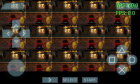
   
Phones: Poco F3 8GB/256GB (Snapdragon 870 5G) and Redmi Note 6 Pro 4/64GB (Snapdragon 636)

PC: AMD Ryzen 5 3600 / 16GB RAM DDR4 3600MHz / NVIDIA GTX 1660 Ti 6GB / Windows 10 Pro
#2
I also have this problem. whenever i change the music (and the text displaying the name of the song comes up) it looks normal. When the text fades away, it goes back to "Multiple Screens"
[Image: zkfk93.jpg]

Changed music...
[Image: qybamd.jpg]


anything besides that, this here also happens:
[Image: 2v9ek36.jpg]

PS: I used Windows 7, with "v0.8.1".
I've tried with "v0.8.1-63-gb126048" but it laggs really badly. It goes low to about 40fps and under.
#3
I have the same issue. Everything loads fine, I can buy the first car, but as soon as I start the first race I get the multiple screens as posted by the other users. Also, the music is garbled at times and there is no voice sound at all in the cut scene. It works great with my Xbox USB Controller which is awesome.

If I just had one screen instead of 20 smalls ones anyway lol Thanks and you are awesome, Henrik! Tongue
#4
I still cannot find a fix for this bug! Sad I am using the newest version on windows 7 and the multiple screens will not go away! HELP!!
#5
(07-17-2013, 02:38 AM)lissa Wrote: I still cannot find a fix for this bug! Sad I am using the newest version on windows 7 and the multiple screens will not go away! HELP!!
Have you opened an issue on here: https://github.com/hrydgard/ppsspp/issue...state=open

Mention it on there, as it will not be forgotten on there.
#6
(07-17-2013, 10:22 AM)The Phoenix Wrote:
(07-17-2013, 02:38 AM)lissa Wrote: I still cannot find a fix for this bug! Sad I am using the newest version on windows 7 and the multiple screens will not go away! HELP!!
Have you opened an issue on here: https://github.com/hrydgard/ppsspp/issue...state=open

Mention it on there, as it will not be forgotten on there.

I have no idea how to use that site you linked to. Someone else said there was a fix but as of yet I cannot find it. Sad


Forum Jump: