Posts: 10
Threads: 0
Joined: May 2015
Reputation:
0
I try to connect in Monster Hunter freedom Unite, Dragon Ball Tenkaichi Tag Team, Tony Hawk Project 8 and all Naruto games. I Always get the same error in adhoclocal-simplechat but Normal PPSSPP work fine. I try change bind IP and use two adhoclocal-simplechat but nothing help. I use built-in Pro Ad hoc server because I don't understand any single word (I see only squere) from site where you can download executable Adhoc PRO server.
Posts: 358
Threads: 13
Joined: Mar 2013
Reputation:
15
09-01-2015, 12:46 PM
(This post was last modified: 09-02-2015, 03:32 AM by onelight.)
(08-29-2015, 12:55 PM)Radarow Wrote: I try to connect in Monster Hunter freedom Unite, Dragon Ball Tenkaichi Tag Team, Tony Hawk Project 8 and all Naruto games. I Always get the same error in adhoclocal-simplechat but Normal PPSSPP work fine. I try change bind IP and use two adhoclocal-simplechat but nothing help. I use built-in Pro Ad hoc server because I don't understand any single word (I see only squere) from site where you can download executable Adhoc PRO server.
if you didn't have executable Adhoc PRO server. try this build, enable buin-in pro ad hoc.
PPSSPP-v1.0.1-832-adhoclocal-chatSimple.7z: http://www.545c.com/file/115947803
EDIT: add mediafire link http://www.mediafire.com/download/iz39mu...tSimple.7z
(08-15-2015, 02:12 AM)Relic1882 Wrote: I finally got it! I had my PPSSPP versions mixed up. First, I ran the Adhoc PRO server(the stand alone), then I ran the adhoclocal-simplechat version to host the hunts, then I ran the Standard Download PPSSPP version for my son. As long as I do it in that order, everything works! The only issue is that if the adhoclocal-simplechat version leaves the online gathering hall and tries to come back, I get a socket error. I'm not sure why, but it goes away just by restarting PPSSPP. Good enough for me!  Thanks again for the tutorial and help.
after PPSSPP-v1.0.1-832-adhoclocal-chatSimple, I try do some improve, it fixed the socket error you get. I also fixed no play when using buil-in pro adhocserver.
you can also try using two PPSSPP adhoclocal build, but one of PPSSPP no enable "specify client address"
Posts: 358
Threads: 13
Joined: Mar 2013
Reputation:
15
09-01-2015, 02:39 PM
(This post was last modified: 09-13-2015, 12:04 AM by onelight.)
@lumune Would you like to test GVGNP using PPSSPP-v1.0.1-832-adhoclocal-chatSimple with JPCSP(play adhoclocal or play online).
I get twice successful online multiplayer, without disconnect (jpcsp host, ppsspp join, disabale CPU entry)
EDIT: the 3rd I try disconncet after 120s, well, it not very helpful.
Posts: 10
Threads: 0
Joined: May 2015
Reputation:
0
(09-01-2015, 12:46 PM)onelight Wrote: (08-29-2015, 12:55 PM)Radarow Wrote: I try to connect in Monster Hunter freedom Unite, Dragon Ball Tenkaichi Tag Team, Tony Hawk Project 8 and all Naruto games. I Always get the same error in adhoclocal-simplechat but Normal PPSSPP work fine. I try change bind IP and use two adhoclocal-simplechat but nothing help. I use built-in Pro Ad hoc server because I don't understand any single word (I see only squere) from site where you can download executable Adhoc PRO server.
if you didn't have executable Adhoc PRO server. try this build, enable buin-in pro ad hoc.
PPSSPP-v1.0.1-832-adhoclocal-chatSimple.7z:
EDIT: add mediafire link
Thanks for help but in mediafire link is ppsspp-v1.0.1-463-adhoclocal-chatSimple and I have this version. Can you post version from first link but on mediafire? because
when I try to click on something in the first link my antivirus get crazy.
Posts: 358
Threads: 13
Joined: Mar 2013
Reputation:
15
Radarow Wrote:Thanks for help but in mediafire link is ppsspp-v1.0.1-463-adhoclocal-chatSimple and I have this version. Can you post version from first link but on mediafire? because
when I try to click on something in the first link my antivirus get crazy.
Sorry, here is the right link http://www.mediafire.com/download/iz39mu...tSimple.7z
Posts: 10
Threads: 0
Joined: May 2015
Reputation:
0
09-02-2015, 02:36 PM
(This post was last modified: 09-02-2015, 02:38 PM by Radarow.)
This didn't help  Now when i try to connect It show this same error an my pro AdhocServer IP change to 127.XXX.XXX.XXX (this X is random number). I really wanna to play with friend together in one room but this is not for me :/
Posts: 358
Threads: 13
Joined: Mar 2013
Reputation:
15
09-02-2015, 03:11 PM
(This post was last modified: 09-02-2015, 03:12 PM by onelight.)
(09-02-2015, 02:36 PM)Radarow Wrote: This didn't help Now when i try to connect It show this same error an my pro AdhocServer IP change to 127.XXX.XXX.XXX (this X is random number). I really wanna to play with friend together in one room but this is not for me :/
If enable "specify client address", it will get random local pro AdhocServer IP, "specify client address" is only for play muliplayer 2(or more) PPSSPPs on same PC.
don't enable "specify client address" when you want play muliplayer with different PC.
Posts: 10
Threads: 0
Joined: May 2015
Reputation:
0
I know. I want to play on one PC. It work when I play with another PC but he is in another room so I can't talk normally with my friend.
Posts: 358
Threads: 13
Joined: Mar 2013
Reputation:
15
09-02-2015, 04:18 PM
(This post was last modified: 09-02-2015, 04:22 PM by onelight.)
(09-02-2015, 04:06 PM)Radarow Wrote: I know. I want to play on one PC. It work when I play with another PC but he is in another room so I can't talk normally with my friend.
When play on one PC, you should run 2 PPSSPP-adhoclocal from different folder.
for settings:
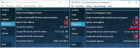
note: the PPSSPP which not enable "specify client address" also should using local pro AdhocServer IP (127.XXX.XXX.XXX) .
BTW, which game do you want to play, as I know, for Monster Hunter , the one whose PPSSPP enable "specify client address" shold hosting hunting mission.
Posts: 10
Threads: 0
Joined: May 2015
Reputation:
0
09-03-2015, 03:34 PM
(This post was last modified: 09-03-2015, 03:37 PM by Radarow.)
Nothing help When I enable "specify client address" in first PPSSPP-adhoclocal and try to connect I have the same socket error but in second PPSSPP where this option is disabled, it show "Network initialized". Thanks for help but I must give up.
Posts: 358
Threads: 13
Joined: Mar 2013
Reputation:
15
09-03-2015, 04:09 PM
(This post was last modified: 09-03-2015, 04:35 PM by onelight.)
(09-03-2015, 03:34 PM)Radarow Wrote: Nothing help When I enable "specify client address" in first PPSSPP-adhoclocal and try to connect I have the same socket error but in second PPSSPP where this option is disabled, it show "Network initialized". Thanks for help but I must give up.
What socket error you get? do you have enable buil-in pro serve? the PPSSPP which enabling buil-in pro server should run game first
what about you settings?
Oh , I remember now, I only get "socket error (10065) when connecting to 127.0.0.1/127.0.0.1:27312" when I tested on WindowsXP.
if you are using windowsXP, you should updata it to win7/win8/win10, or I have nothing can help you.
Posts: 10
Threads: 0
Joined: May 2015
Reputation:
0
I have "socket error (10065) when connecting to 127.XXX.XXX.XXX/127.XXX.XXX.XXX:27312". Of course I have enabled buil-in pro serve and run this one first. You can trust me that I do everything correct like in tutorial. I think its something wrong with my internet. I found this information on microsoft website:
WSAEHOSTUNREACH
10065
No route to host.
A socket operation was attempted to an unreachable host. See WSAENETUNREACH.
I don't know what this mean and what I should do, because I not too good in things about internet.
Posts: 358
Threads: 13
Joined: Mar 2013
Reputation:
15
(09-03-2015, 04:50 PM)Radarow Wrote: I have "socket error (10065) when connecting to 127.XXX.XXX.XXX/127.XXX.XXX.XXX:27312". Of course I have enabled buil-in pro serve and run this one first. You can trust me that I do everything correct like in tutorial. I think its something wrong with my internet. I found this information on microsoft website:
WSAEHOSTUNREACH
10065
No route to host.
A socket operation was attempted to an unreachable host. See WSAENETUNREACH.
I don't know what this mean and what I should do, because I not too good in things about internet. are you using windows XP?
Posts: 10
Threads: 0
Joined: May 2015
Reputation:
0
At this PC yes I use XP. Don't tell me that this doesn't work on it :/
Posts: 358
Threads: 13
Joined: Mar 2013
Reputation:
15
(09-03-2015, 05:16 PM)Radarow Wrote: At this PC yes I use XP. Don't tell me that this doesn't work on it :/
No, adhoclocal doesn't work on XP.
|




