Thread Rating:
  • 0 Vote(s) - 0 Average
  • 1
  • 2
  • 3
  • 4
  • 5
FIFA Soccer (ULUS10011)
#1
Title: FIFA Soccer
Genre: Soccer / Football
Game ID: ULUS10011
Region: USA
Format: ISO
Version: v0.8.1-539-geaa59f9
OS Tested on: Windows 7 x86(32 Bit)
Compatibility: Playable
Notes: The game boots up Ok, shows logo's, demo videos all show correctly as do the replays of the highlights, all menu's seem to display correctly as do the loading screens, The in game graphics look perfect to me, The games audio sounds like its all there, especially in matches.

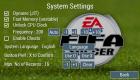
Update: Go to Settings / System / Tick Unlock CPU Clock & set Frequency to 200, this makes FIFA Soccer run as smooth as silk, even better than it plays on the actual PSP in my humble opinion.

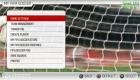
Settings used: Default, Use settings as shown in settings screen shots.



Reply
#2
Legal.muiti daora,so nai consigo baixar o jogo
Reply
#3
(07-26-2013, 03:38 PM)pedro henrique Wrote: Legal.muiti daora,so nai consigo baixar o jogo

Only English here. Links to Download games are not allowed in forum.

Hey, it (Unlock CPU Clock to 200) works with others FIFA games?
Phones: Poco F3 8GB/256GB (Snapdragon 870 5G) and Redmi Note 6 Pro 4/64GB (Snapdragon 636)

PC: AMD Ryzen 5 3600 / 16GB RAM DDR4 3600MHz / NVIDIA GTX 1660 Ti 6GB / Windows 10 Pro
Reply
#4
(07-26-2013, 07:34 PM)GuilhermeGS2 Wrote: Hey, it (Unlock CPU Clock to 200) works with others FIFA games?
Afraid not my friend, all other FIFA Soccer's all Crash so far.
Reply
#5
(07-26-2013, 07:34 PM)GuilhermeGS2 Wrote: Hey, it (Unlock CPU Clock to 200) works with others FIFA games?
Yes the Unlock CPU Clock to 200 or less works with the other FIFA Games now. (FIFA 2012 & FIFA 2013). That is on Windows, Unsure about Android ???
Reply
#6
(08-26-2013, 08:25 AM)The Phoenix Wrote:
(07-26-2013, 07:34 PM)GuilhermeGS2 Wrote: Hey, it (Unlock CPU Clock to 200) works with others FIFA games?
Yes the Unlock CPU Clock to 200 or less works with the other FIFA Games now. (FIFA 2012 & FIFA 2013). That is on Windows, Unsure about Android ???
I not play FiFa 13 with Unlock Cpu clock 200
Why ?????
Reply
#7
(08-26-2013, 12:18 PM)n1dminhd Wrote:
(08-26-2013, 08:25 AM)The Phoenix Wrote:
(07-26-2013, 07:34 PM)GuilhermeGS2 Wrote: Hey, it (Unlock CPU Clock to 200) works with others FIFA games?
Yes the Unlock CPU Clock to 200 or less works with the other FIFA Games now. (FIFA 2012 & FIFA 2013). That is on Windows, Unsure about Android ???
I not play FiFa 13 with Unlock Cpu clock 200
Why ?????
Are you talking about using Windows version 32 bit.
And using latest version of PPSSPP v0.9.1-174-g9667b9e - if not then download emulator from here: http://buildbot.orphis.net/ppsspp/index.php
Also I used the ULES01565 : FIFA 13 game.
setup your settings first then run game, keep on pressing TAB on keyboard to fast forward through the slow area's.
When it gets to the Autosave screen, you must press 'O' (X on my keyboard).
It takes a while to progress through the Logo's ETC, as they are mostly grey screens.
Same thing happens on FIFA 12 & it seems on World Cup 2010 Edition.
Reply
#8
Very Thanks !
Reply
#9
(08-26-2013, 02:34 PM)n1dminhd Wrote: Very Thanks !
In fact lower the Unlock CPU Speed to 150 even better gameplay using that.
Reply


Forum Jump: