Posts: 5,371
Threads: 14
Joined: Mar 2013
Reputation:
303
Merged.
♦ Intel Core i7-6700HQ | 16 GB RAM | NVIDIA GeForce GTX 960M | Debian Testing
♦ Intel Core i7-2630QM | 4 GB RAM | NVIDIA GeForce GT 540M | Debian Testing
♦ PSP-3004 | 6.60 PRO-C2
Posts: 2
Threads: 0
Joined: Jul 2014
Reputation:
0
The ending goes black... what should i do??? I finished the game but the ending after cinematics just go black screen. >__<
Posts: 21
Threads: 1
Joined: Aug 2014
Reputation:
0
08-23-2014, 11:28 AM
(This post was last modified: 08-23-2014, 11:31 AM by FrozenDevilz.)
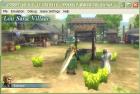
Founded such a very disturbing bugs (
look at those plants), any way to fix these? Thanks before
My Specs
OS: Microsoft Windows XP Professional (5.1, Build 2600)
System Manufacturer: TOSHIBA
System Model: Satellite C640
BIOS: InsydeH20 Ver. 03.61.081.30
Processor: Intel® Pentium® CPU B950 @ 2.10GHz (2 CPUs)
Memory: 1990MB RAM
DirectX Ver: DirectX 9.0c
Chip Type: Intel® HD Graphics Family
Chip Memory: 256.0 MB
Sound Output: Conexant HD Audio Output
My Graphic Settings
Rendering Mode
Mode: Buffered Rendering
Block Transfer: Unticked
Frame Rate Control
Frameskipping: 2
Auto Frameskip: Ticked
GOW Speed Up: Ticked
Alternative Speed: 0
Features
Postprocessing Shader: Off
Fullscreen: Unticked
Stretch Display: Unticked
Small Display: Unticked
Performance
Rendering Resolution: 2x PSP
VSync: Untcked
Mipmapping: Unticked
Hardware Transform: Ticked
Software Skin: Ticked
Vertex Cache: Ticked
Lazy Texture Cache: Unticked
Retain Changed Textures: Unticked
Disable Slower Effects: Unticked
Spline/Bezier Curves Quality: High
Texture Scaling
Upscale Level: Auto
Upscale Type: xBRZ
Deposterize: Unticked
Texture Filtering
Anisotropic Filter: 16x
Texture Filtering: Auto
Hack Settings
Timer Hack: Unticked
Disable Alpha Test: Ticked
Disable Stencil Test: Unticked
Force Depth Write: Unticked
Texture Coord Speedhack: Unticked
Overlay Information
Show FPS Counter: None
Show debug Statistics: Unticked
Debugging
Dump Next Frame to Log: Disabled (Don't Know Why)
Software Rendering: Unticked
My System Settings
Fast Memory: Unticked
Multithreaded: Unticked
I/O on Thread: Unticked
Force Real Clock Sync: Unticked
Change Emulated PSP's CPU Clock: 0
Rewind Snapshot Frequency: 0
Atomic Audio Locks: Unticked
Enable Windows Native Keyboard: Unticked
PSP Model: PSP-1000
Dynarec: Ticked
Dump Decrypted EBOOT.BIN on Game Boot: Unticked
Debug Logging: Ticked
My Discord Server: discord.me/devilzgaming
My Steam Group: http://steamcommunity.com/groups/DevilzGamingGroup
Posts: 21
Threads: 1
Joined: Aug 2014
Reputation:
0
(08-23-2014, 11:52 AM)The Phoenix Wrote: Hi there,
I just checked your settings & you need to Untick (Disable Alpha Test: Ticked) - that will solve your problem my friend. 
Very Helpful!
Now all the same bugs on other game such as that one also gone!
Thank you so much!

My Discord Server: discord.me/devilzgaming
My Steam Group: http://steamcommunity.com/groups/DevilzGamingGroup
Posts: 13
Threads: 2
Joined: Jan 2014
Reputation:
0
in newest verson, I cann't see button when starts game , and when i choose item the button hidden
Posts: 21
Threads: 1
Joined: Aug 2014
Reputation:
0
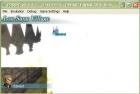
After updating to the latest ppsspp version, I found the most disturbing glitch in my experience using this emulator, can anyone help me how to solve this problem? Thanks before
My Specs
OS: Microsoft Windows XP Professional (5.1, Build 2600)
System Manufacturer: TOSHIBA
System Model: Satellite C640
BIOS: InsydeH20 Ver. 03.61.081.30
Processor: Intel® Pentium® CPU B950 @ 2.10GHz (2 CPUs)
Memory: 1990MB RAM
DirectX Ver: DirectX 9.0c
Chip Type: Intel® HD Graphics Family
Chip Memory: 256.0 MB
Sound Output: Conexant HD Audio Output
My Graphic Settings
Rendering Mode
Mode: Buffered Rendering
Block Transfer: Unticked
Frame Rate Control
Frameskipping: 2
Auto Frameskip: Ticked
GOW Speed Up: Ticked
Alternative Speed: 0
Features
Postprocessing Shader: Off
Fullscreen: Unticked
Stretch Display: Unticked
Small Display: Unticked
Performance
Rendering Resolution: 3x PSP
VSync: Untcked
Mipmapping: Unticked
Hardware Transform: Ticked
Software Skin: Ticked
Vertex Cache: Ticked
Lazy Texture Cache: Unticked
Retain Changed Textures: Unticked
Disable Slower Effects: Ticked
Spline/Bezier Curves Quality: High
Texture Scaling
Upscale Level: Auto
Upscale Type: xBRZ
Deposterize: Unticked
Texture Filtering
Anisotropic Filter: 16x
Texture Filtering: Auto
Hack Settings
Timer Hack: Unticked
Disable Alpha Test: Unticked
Disable Stencil Test: Unticked
Force Depth Write: Unticked
Texture Coord Speedhack: Ticked
Overlay Information
Show FPS Counter: None
Show debug Statistics: Unticked
Debugging
Dump Next Frame to Log: Disabled (Don't Know Why)
Software Rendering: Unticked
My System Settings
Fast Memory: Unticked
Multithreaded: Unticked
I/O on Thread: Unticked
Force Real Clock Sync: Unticked
Change Emulated PSP's CPU Clock: 0
Rewind Snapshot Frequency: 0
Atomic Audio Locks: Unticked
Enable Windows Native Keyboard: Unticked
PSP Model: PSP-1000
Dynarec: Ticked
Dump Decrypted EBOOT.BIN on Game Boot: Unticked
Debug Logging: Ticked
My Discord Server: discord.me/devilzgaming
My Steam Group: http://steamcommunity.com/groups/DevilzGamingGroup
Posts: 13
Threads: 4
Joined: Oct 2014
Reputation:
0
Can you guys give me a list of DWS DLC packs for the ppsspp? I want to play the DLC on the psp emulator.
Posts: 5,371
Threads: 14
Joined: Mar 2013
Reputation:
303
Merged.
♦ Intel Core i7-6700HQ | 16 GB RAM | NVIDIA GeForce GTX 960M | Debian Testing
♦ Intel Core i7-2630QM | 4 GB RAM | NVIDIA GeForce GT 540M | Debian Testing
♦ PSP-3004 | 6.60 PRO-C2
Posts: 38
Threads: 3
Joined: Feb 2015
Reputation:
1
Is anyone know how to play multiplayer on this game
Posts: 4
Threads: 0
Joined: Aug 2016
Reputation:
0
08-15-2016, 01:45 AM
(This post was last modified: 08-15-2016, 06:42 AM by Mark98T.)
+1 for multiplayer.
All hack unticked. Fast Mem, Multi-Thread, IO on thread is on. No frameskip and limit at 60fps. Non-buffer. Simulate block transfer is off. Performance all on except for mipmapping, software skinning, and retain changed texture.
Ip address are same for the one that enable ad-hoc. Port offset is 8000 and different mac address.
Situation: Network initialized -> enter city 1 -> meet each other and can see each other move around and both name displayed at bottom left -> one accept some quest and got flag in his name in his ppsspp, but on my ppsspp quest flag didn't appear -> can't accept/join his quest from start menu or from quest board/guard. Trade is not working too.
Posts: 12
Threads: 1
Joined: May 2020
Reputation:
0
Is adhoc fixed for this game?





