


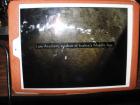
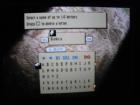
How do I get rid of the black boxes when I play Final Fantasy Tactics? They appear behind text and pointers like in these screenshots; I'm using PPSSPP Gold V1.0 on Android.
forums.PPSSPP.org
›
PPSSPP - Playstation Portable Simulator Suitable for Playing Portably
›
General Discussion and Announcements

 How Do I Get Rid Of The Black Boxes?
How Do I Get Rid Of The Black Boxes?
|
How Do I Get Rid Of The Black Boxes?
|

02-18-2015, 06:50 AM
Uncheck "disable alpha test". Avoid using speedhacks if possible.
-[Unknown]
02-18-2015, 01:51 PM
Alpha test is & has been disabled and the black boxes are there. That isn't the fix.
02-18-2015, 03:33 PM
(02-18-2015, 01:51 PM)cursedgame Wrote: Alpha test is & has been disabled and the black boxes are there. That isn't the fix. Disabling the alpha test is how you get black boxes. You do not want alpha test disabled, even though it does make PowerVR devices faster. If you have black boxes with default settings then most likely your graphics card driver is completely broken. -[Unknown]
02-18-2015, 04:10 PM
02-18-2015, 04:23 PM
I turned the alpha test back on & still have black boxes, I'm going to look for and updated graphics driver or SOMETHING!
02-19-2015, 02:29 AM
I tried a few more things and couldn't find a solution. I guess my only choice is to wait for a PPSSPP update and not use the emulator. That's a shame 'cause I was really looking forward to playing some Final Fantasy Tactics: The War Of The Lions!
I decided to post here since this is the latest post on this issue. I was having problems randomly once I entered the hospital in SH: Origins. I noticed it was doubling up the textures and throwing a transparent version roughly 2 iches to the left of the screen. My character would walk through these sections and disappear and the only fix seemed to be just not using the flash light. This was pretty rough considering how silent hill games play. I'm fairly certain I fixed the issue ticking these two boxes as follows.
Disable Alpha Test (powerVR speedup, artifacts) - Check Disable Stencil Test - Check Some picture examples of the problem before checking boxes: The transparent dead nurse randomly being shown on the left. Black box cutting off the side of the screen. I hope this helps anyone else wanting to play this game in big full screen on their monitor! I for one had trouble playing it on my tiny psp 2000 screen. Let me know if it helps, good luck. |
|
« Next Oldest | Next Newest »
|
