Thread Rating:
  • 0 Vote(s) - 0 Average
  • 1
  • 2
  • 3
  • 4
  • 5
X and Y tilt control inverted
#1
Hi

When I select tilt to control analog stick, on Android Asus TF300T, the commands seems to be inverted between X and Y.

Up = Left
Down = Right
Right = Down
Left = Up

I dont know if it has any relation with the game I'm playing (Gods Eater Burst).

I can select 'invert the tilt axis' so Up would be Right instead Left.

I didnt test in any other devices...


Thanks

BTW: It is the 0.9.5-213-g2fe898c version!

Reply
#2
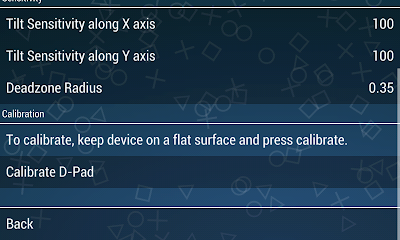
Seems you need to calibrate your device's accelerometer. You can go in constrols' settings and in custromize tilt, scroll down and tap in calibrate D-pad (remember to put the device on flat superficie). I think it should calibrate your device. You also can download a specific app on Play Store.

[Image: Screenshot_2013-12-20-09-39-32.png]
Phones: Poco F3 8GB/256GB (Snapdragon 870 5G) and Redmi Note 6 Pro 4/64GB (Snapdragon 636)

PC: AMD Ryzen 5 3600 / 16GB RAM DDR4 3600MHz / NVIDIA GTX 1660 Ti 6GB / Windows 10 Pro
Reply
#3
I have the same problem with the archos gamepad 2, the calibrate option doesnt fix that, help please?
Reply


Forum Jump: