Posts: 5
Threads: 1
Joined: May 2016
Reputation:
0
05-19-2016, 05:18 PM
(This post was last modified: 05-20-2016, 12:03 AM by Dante98.)
HI! PPSSPP running in ASUS 8gb RAM, Intel i5, NVidia GT 200 Series and GNU/Linux Ubuntu 16 installed via PPA.
I have a problem with saving game. In savegame screen font looks like squares.
I know it's happening in another aplications, example, because don't have suported font installed but ***how and why in ppsspp***?
Runnink OK in Ubuntu 14.04.
Can you help me to solve this?
Posts: 383
Threads: 8
Joined: Mar 2014
Reputation:
3
Missing fonts?
Old laptop: Lenovo G458
AMD/ATI Radeon HD 7310 | 1366x768@60Hz | APU E1-1200 Dual Core | 2.5 GB DDR3 400MHz | Windows 7 Home Premium 32-bit
New laptop: Lenovo ideapad 100
Nvidia Geforce 920M 2GB / Intel HD Graphics 5500 | 1366x768@60Hz | Intel Core i3-5005U 2GB | 2GB DDR3 2000MHz | Window 10 Home 64-bit
Posts: 5
Threads: 1
Joined: May 2016
Reputation:
0
Yes. Looks like it's missing fonts but have no idea how to fix. What type of font and how o where put this. It's not happening in Ubuntu 14 or fedora 23.
Posts: 383
Threads: 8
Joined: Mar 2014
Reputation:
3
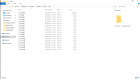
PPSSPP have its own font files (pic bellow)
Might wanna get Henrik's help with this problem
Old laptop: Lenovo G458
AMD/ATI Radeon HD 7310 | 1366x768@60Hz | APU E1-1200 Dual Core | 2.5 GB DDR3 400MHz | Windows 7 Home Premium 32-bit
New laptop: Lenovo ideapad 100
Nvidia Geforce 920M 2GB / Intel HD Graphics 5500 | 1366x768@60Hz | Intel Core i3-5005U 2GB | 2GB DDR3 2000MHz | Window 10 Home 64-bit
Posts: 5
Threads: 1
Joined: May 2016
Reputation:
0
Thanks! Good. Means the problem is not a font. Font files is there. Left to us know why application don't reach it. To make shure I check files permission and all set to read mode for all users in installation. I'm afraid this is a common problem in ppsspp 1.2.2 or Ubuntu 16, or both. I got it this two times in two systems. Where I can find log file?
dante@m-dante01:/usr/share/ppsspp/assets/flash0/font$ ls
jpn0.pgf ltn10.pgf ltn13.pgf ltn1.pgf ltn4.pgf ltn7.pgf
kr0.pgf ltn11.pgf ltn14.pgf ltn2.pgf ltn5.pgf ltn8.pgf
ltn0.pgf ltn12.pgf ltn15.pgf ltn3.pgf ltn6.pgf ltn9.pgf
Posts: 383
Threads: 8
Joined: Mar 2014
Reputation:
3
Try running one of the .dat file in the red square in the picture. Then close the PPSSPP, it should make a log notepad (I never used it, so I maybe wrong)

Old laptop: Lenovo G458
AMD/ATI Radeon HD 7310 | 1366x768@60Hz | APU E1-1200 Dual Core | 2.5 GB DDR3 400MHz | Windows 7 Home Premium 32-bit
New laptop: Lenovo ideapad 100
Nvidia Geforce 920M 2GB / Intel HD Graphics 5500 | 1366x768@60Hz | Intel Core i3-5005U 2GB | 2GB DDR3 2000MHz | Window 10 Home 64-bit





